This n8n AI agents guide is updated for the current AI Agent node. This guide is for people who want to build useful AI workflows, not another demo that says “hello” and stops there.
n8n becomes interesting when an AI model can use your real tools: email, a CRM, a database, a calendar, a help desk, or an internal API. It also becomes risky at exactly the same moment. A workflow that can read and write business data needs clear boundaries, reliable inputs, and a way to fail safely.
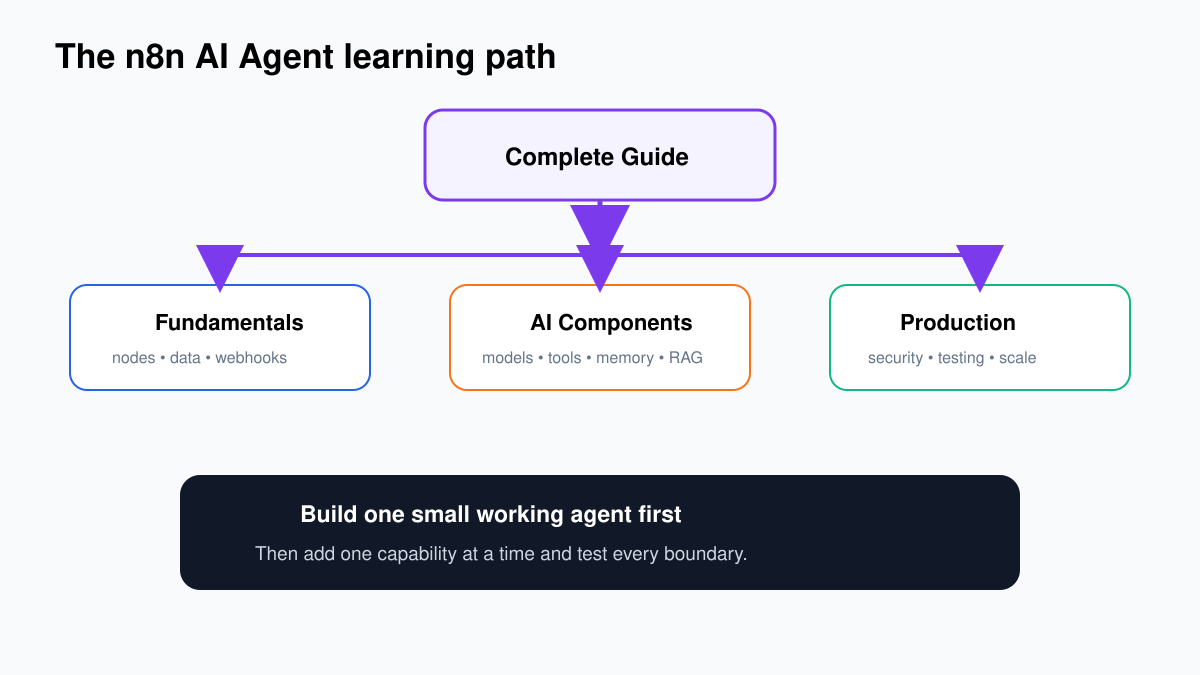
This page gives you the whole map. You can follow it from your first workflow to a production system, or jump directly to the part you need.
Choose your route
- I am completely new: start with n8n fundamentals, then build your first AI agent.
- I understand workflows: go to AI agent components and design.
- I need a real use case: browse the practical n8n workflow tutorials.
- I run n8n myself: use the self-hosting and production guide.
- My workflow is unreliable: open testing and troubleshooting.
What an n8n AI agent actually is
A normal automation follows a route you defined in advance: when this happens, do A, then B, then C. An AI agent adds a decision-maker. It receives a goal, looks at the tools you have allowed, and chooses which tool to call next.
That distinction matters. If every order confirmation should be copied into a spreadsheet, you do not need an agent. A fixed workflow is cheaper, faster, and easier to debug. If an incoming message may require a knowledge search, a customer lookup, a draft reply, or a human review depending on its meaning, an agent can be useful.
n8n’s current AI Agent node uses the tools-agent pattern. You connect a chat model and at least one tool. The old choice between several “agent types” was removed; tutorials built around that menu are now outdated. The practical question is no longer which agent label to select. It is what the agent may see, what it may do, and when a person must approve an action.
The five parts of a reliable agent
| Part | What it does | What usually goes wrong |
|---|---|---|
| Trigger | Starts the workflow from chat, email, a schedule, webhook, or another event. | The workflow accepts untrusted or incomplete input. |
| Model | Interprets the request and decides what to do. | The model is too expensive, too slow, or inconsistent for the task. |
| Instructions | Define the role, limits, output, and escalation rules. | Vague prompts leave important decisions to chance. |
| Tools | Let the agent search, calculate, read, write, or call another workflow. | A powerful tool is available without validation or approval. |
| Memory and data | Provide conversation history or retrieved business context. | Old, private, or irrelevant context contaminates the answer. |
Start with a workflow contract
Before touching the canvas, write a short contract. It should fit on one screen:
- Input: exactly what enters the workflow?
- Outcome: what useful result should exist at the end?
- Allowed actions: which systems may the agent read or change?
- Forbidden actions: what must never happen automatically?
- Escalation: which cases go to a person?
- Evidence: what log proves that the workflow behaved correctly?
For an email triage agent, the contract might say: read new support email, classify the issue, retrieve the customer record, draft a reply, and send the draft to an agent for approval. It must never send a refund, alter an account, or email the customer without approval. That one paragraph will improve the workflow more than another page of prompt tricks.
A sensible build order
- Make the non-AI path work. Confirm that the trigger produces the fields you expect and that each integration can authenticate.
- Add the model with one narrow task. Classification is a good first test because the result is easy to inspect.
- Force a usable output shape. Ask for fields such as category, urgency, summary, and reason. Validate them before the next node.
- Add one tool at a time. Test each tool directly before allowing the agent to choose it.
- Put a person before consequential actions. Sending, deleting, paying, publishing, and changing customer records deserve review.
- Create failure routes. Decide what happens after a timeout, bad output, missing record, rate limit, or repeated attempt.
- Test with awkward examples. Empty messages, conflicting instructions, long attachments, hostile text, duplicate events, and missing fields reveal the real design.
Agents, chains, and ordinary workflows
People often use an agent where a simpler pattern would be better. Use an ordinary workflow when the route is known. Use a chain when the route is known but one or more steps need AI, such as extract → summarize → format. Use an agent when the route itself must change according to the request.
| Pattern | Best for | Control | Cost and debugging |
|---|---|---|---|
| Fixed workflow | Moving and transforming predictable data | Highest | Lowest |
| AI chain | A known sequence with language tasks | High | Moderate |
| AI agent | Requests that need different tools or steps | Lower unless carefully constrained | Highest |
If you cannot explain why the path must be dynamic, start with a chain.
If you are still choosing a platform, compare n8n, Zapier and Make for AI automation before you build a large library of workflows.
How tools should be designed
A tool should do one clear job and expose only the fields the agent needs. “Manage CRM” is a dangerous tool description. “Find customer by verified email” and “create follow-up task with title and due date” are easier to test and restrict.
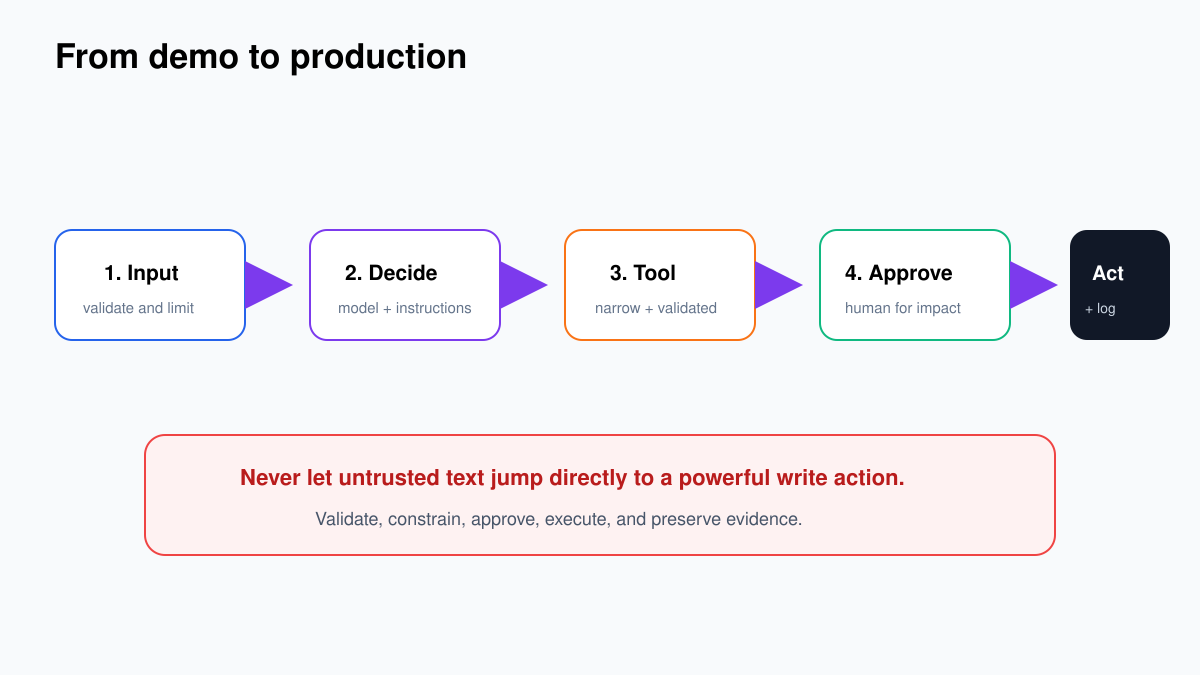
For important actions, separate preparation from execution. Let the agent prepare a proposed record or message. Validate it with normal n8n nodes. Ask for approval. Only then call the node that changes the outside system. This design also creates a clean audit trail.
Read the deeper guides on designing agent tools, human approvals, and structured output.
Memory is not the same as knowledge
Conversation memory keeps a dialogue coherent. A knowledge system retrieves relevant passages from documents or databases. Mixing the two leads to bloated prompts and surprising answers.
Use short conversation memory when the next turn depends on the last few turns. Use retrieval when the answer depends on policies, manuals, products, or customer records. Keep durable business state in a real database. The agent can read that state through a narrow tool instead of “remembering” it in a chat history.
See the n8n memory guide and the practical RAG guide.
Security: treat every external input as untrusted
An email, web page, PDF, support ticket, or retrieved document can contain instructions aimed at the model. The model may treat those instructions as if they came from you. That is prompt injection.
Do not solve this with a sentence such as “ignore malicious instructions.” Reduce what the agent can access, allow-list tools, validate arguments, separate read and write tools, require approval, and avoid putting secrets in prompts. For self-hosted installations, update n8n promptly, use TLS, restrict editor access, isolate task runners, back up your database and encryption key, and review exposed webhooks.
Use the n8n agent security checklist before a real deployment.
Testing beyond “it worked once”
Create a small evaluation set before changing prompts or models. Twenty representative cases are more useful than repeatedly trying the easiest example. Include normal requests, ambiguous requests, missing data, adversarial instructions, and cases that must escalate.
Record the expected category, tool, output fields, and approval decision for each case. Run the set after every meaningful change. Track quality, tool errors, latency, and cost separately; one number cannot explain all four.
The detailed process is in testing n8n AI workflows and debugging common n8n failures.
A worked architecture: support triage without reckless automation
Imagine a shared inbox receiving product questions, bug reports, billing disputes, and account-security concerns. The weak design gives an agent Gmail access and says “handle support.” The stronger design separates understanding, evidence, proposal, and action.
- Trigger: a new message arrives with a provider event ID.
- Normalize: keep the message ID, verified sender record, subject, clean body, and attachment metadata. Reject a missing ID.
- Classify: use structured output for category, urgency, summary, and whether a human is required.
- Route: security, billing disputes, legal language, and low-confidence results go directly to a person.
- Retrieve: search only the approved knowledge collection for the chosen product and region.
- Draft: prepare a reply that uses the retrieved evidence and carries the source links into an internal note.
- Validate: confirm the recipient, allowed claims, length, and required fields with ordinary nodes.
- Approve: show the exact draft, evidence, customer record, and risk flags to a reviewer.
- Send: a narrow send step uses the approved draft and a stable idempotency key.
- Observe: log the decision, approval, provider result, duration, and cost without storing unnecessary private content.
Notice how little authority the agent has. It interprets, chooses approved read tools, and proposes. Deterministic nodes and a person control the consequential action. You can later automate a small class of low-risk replies after evaluation data proves it is safe.
Design the data contract between every important step
A data contract is a small list of fields, their types, and the rule for missing values. It prevents a workflow from becoming a chain of assumptions.
| Field | Type | Rule |
|---|---|---|
| event_id | string | Required and unique; stop if absent |
| category | enum | Must match an allowed value; otherwise review |
| urgency | enum | LOW, NORMAL, or HIGH |
| evidence | array | Each item carries source ID and passage |
| proposed_action | object | Validated before approval |
| approved | boolean | False by default; never inferred from silence |
Name the Edit Fields nodes that create these boundaries: Normalize request, Validated classification, and Approved action. When an execution fails, those names tell an operator what the workflow believed at each stage.
A prompt pattern that survives contact with real data
A useful system instruction has six parts:
- Role: the narrow job, such as “classify inbound support requests.”
- Allowed decisions: the categories or tools the model may choose.
- Forbidden behavior: claims, data, or actions it must not produce.
- Evidence rule: what sources it may use and what to do when evidence is missing.
- Output contract: the exact fields or schema.
- Escalation rule: clear cases that require a person.
Keep changing business rules outside the prompt where possible. An allow-list in a normal node is easier to inspect than a sentence buried in a long instruction. Keep examples short and representative. More examples are not automatically better if they crowd out the current request or reinforce accidental wording.
Four reusable agent architectures
| Architecture | Flow | Good first use |
|---|---|---|
| Router | Classify → choose a fixed branch | Inbox or request triage |
| Retriever | Search approved sources → answer with evidence | Internal policy assistant |
| Researcher | Discover → collect sources → extract claims → synthesize | Market or product research |
| Operator | Choose tool → propose action → validate → approve → execute | CRM or help-desk assistance |
Start with the router or retriever. An operator agent has the most impressive demo and the largest consequence when a tool or instruction is wrong.
Move through four launch stages
Stage 1: offline test
Use pinned, synthetic inputs. No production credentials and no external writes. Prove the data contract and failure routes.
Stage 2: shadow mode
Run on real inputs but do not act. Compare the agent’s decisions with what a person actually did. This exposes cases your initial evaluation set missed.
Stage 3: assisted mode
Let the workflow prepare drafts and recommendations. A person reviews every consequential action. Measure acceptance, edits, escalation, latency, and cost.
Stage 4: limited autonomy
Automate only a clearly defined, low-risk group that has strong evaluation results. Keep sampling outcomes and retain a quick disable path. Expand by evidence, not by enthusiasm.
Common design mistakes and the better decision
| Mistake | Better decision |
|---|---|
| One huge agent with every integration | Several narrow tools or sub-workflows with small contracts |
| Sending raw model text to an API | Parse, validate, map, approve, then call the API |
| Using memory as a customer database | Read current state from the system of record |
| Retrying every error | Classify errors and make write actions idempotent |
| Testing only normal requests | Include missing, ambiguous, duplicate, hostile, and high-risk cases |
| Logging complete prompts forever | Retain the minimum data needed for operations and audit |
Production checklist
- The workflow has a named owner.
- Credentials use the least access required.
- Input is validated before reaching the model.
- Outputs are parsed and validated before actions.
- High-impact actions require approval.
- Retries are limited and designed to avoid duplicate actions.
- Failures create an alert or review task.
- Execution data retention matches the sensitivity of the data.
- Cost and latency have reasonable limits.
- Backups and a restore test exist for self-hosted n8n.
- A known-good workflow version can be restored.
What to build first
Choose a task with frequent volume, a clear result, and a cheap failure. Good first projects classify inbound messages, enrich a research list, summarize approved sources, or prepare a draft for review. Bad first projects move money, delete records, publish without review, or make decisions that are difficult to reverse.
If you want one guided build, use the first n8n AI agent tutorial. After that, choose a practical workflow from the tutorials hub and add testing before you add more autonomy.
Reference desk
- Official AI Agent node documentation
- Official guide to n8n AI components
- Official testing and evaluation guide
- Official self-hosting documentation
Next step: if n8n still feels unfamiliar, continue to workflows, nodes and data. If you already build automations, continue to agent components and design.