Troubleshooting n8n workflows starts with proving the outcome, not watching every node turn green. A workflow can finish successfully and still update the wrong row, send the same message twice, accept invalid data, or produce a confident AI answer with no evidence.
This guide gives you a repeatable method for testing ordinary workflows and AI workflows. You will learn how to isolate the first wrong node, build a small test matrix, verify failure behavior, and define evidence that a production run actually did the right thing.
← Return to the complete n8n AI agents guide
Test five layers, in this order
| Layer | Question | Evidence |
|---|---|---|
| Trigger | Did the expected real event start one execution? | Execution ID, trigger time, event ID |
| Data contract | Are required fields present, correctly named, and correctly typed? | Normalized JSON and validation result |
| Decision | Did the correct branch or tool run? | Condition values, branch item counts, tool log |
| Side effect | Was the correct external record changed exactly once? | External record ID and before/after state |
| Recovery | Can the workflow retry or escalate without losing or duplicating work? | Error route, retry count, deduplication key |
Test the layers separately. If a webhook never started an execution, changing a downstream expression cannot help. If the correct JSON reached an If node but the wrong branch ran, do not debug the Gmail credential.
Use a known test record
Create one harmless record whose values and expected result you can calculate by hand:
{
  "eventId": "test_001",
  "customerId": "C1007",
  "email": "n8n-test@example.com",
  "monthlySpend": 120,
  "isActive": true
}
For a workflow that calculates annual spend and routes customers above 1000, the expected result is unambiguous: 120 × 12 = 1440, so one item must leave the true output.
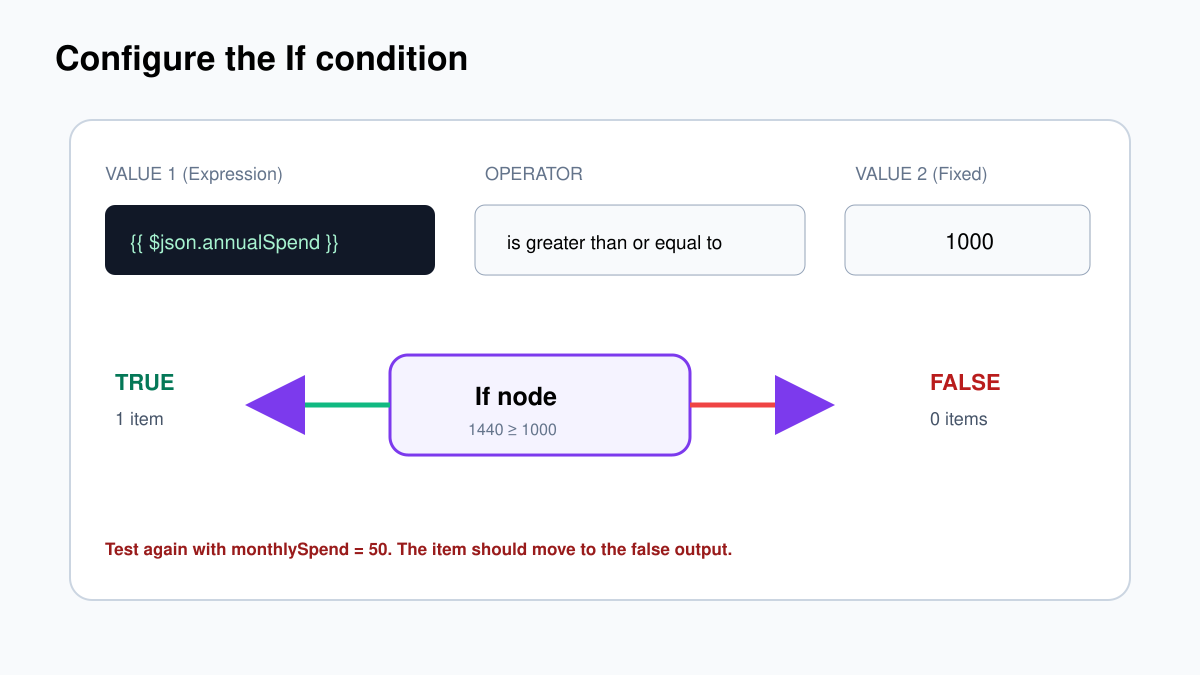
After the happy path, change one variable at a time: remove the email, change monthlySpend to the String "120", set it to zero, use a negative number, and send the same event ID twice. Each test should have a written expected result.
Inspect data at the first wrong node
Open the execution and compare input and output node by node. Stop at the first unexpected value. Later nodes may be failing only because they received bad data.
- Did the node execute?
- How many items arrived?
- What is the exact JSON input?
- What types do the important fields have?
- What does each expression resolve to?
- How many items and which fields left the node?
Use JSON view when a value looks suspicious. Table view can make the number 120 and the string "120" look almost identical. Check capitalization and nesting as well: $json.customer.email is different from $json.email.
Pinning data is helpful while configuring later nodes because it freezes a known input. Unpin it before the final end-to-end test. Otherwise downstream nodes may keep reading your sample while the real trigger appears to run.
Build a small test matrix
You do not need hundreds of cases for every workflow. You do need the cases that exercise each decision and each dangerous failure.
| Case | Input | Expected branch | Expected side effect |
|---|---|---|---|
| Happy path | Complete valid record | Normal | One correct update |
| Missing required field | No eventId | Validation error | No write |
| Boundary | annualSpend exactly 1000 | True for ≥ 1000 | One correct update |
| Wrong type | monthlySpend is text | Quarantine or conversion | No unsafe write |
| Duplicate | Same eventId twice | Second run stopped | Still one update |
| Dependency timeout | API unavailable | Retry, then error route | No partial duplicate |
| Permission failure | Expired/revoked credential | Error route | Actionable alert |
Store the matrix beside the workflow description. When you change a node, rerun the cases that touch it plus the happy path and duplicate-event case.
Test webhooks as a caller would
The Webhook node has different test and production URLs. The test URL works while the editor is listening; the production URL works for an active workflow. Verify both deliberately.
A valid request might be:
curl -i -X POST 'https://automation.example.com/webhook/lead-events' \
  -H 'Content-Type: application/json' \
  -H 'X-Webhook-Secret: replace-me' \
  -d '{"eventId":"evt_1042","email":"asha@example.com"}'
Test an invalid request too:
curl -i -X POST 'https://automation.example.com/webhook/lead-events' \
  -H 'Content-Type: application/json' \
  -d '{"email":"asha@example.com"}'
The first should return a documented success status and body. The second should return a controlled client error, not an HTML stack trace or a false 200.
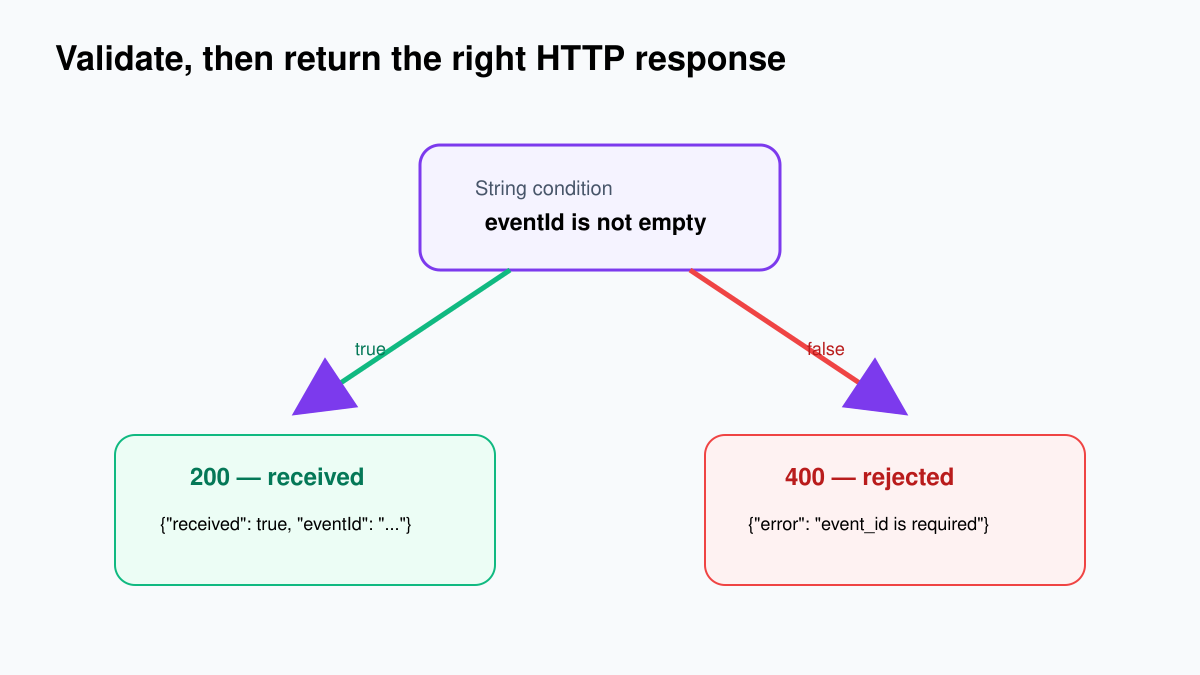
The complete request, response, authentication, and production activation flow is in the n8n webhook tutorial.
Retries and idempotency must be tested together
Retrying a safe read is usually harmless. Retrying “charge card,” “send email,” or “create customer” can duplicate a real-world action. Before enabling retries on a write, decide how a repeated attempt is recognized.
Use a stable key from the source—event ID, message ID, order ID plus version, or another immutable identifier. Store it before the consequential action or use the destination system’s idempotency feature. The test is simple:
- Send event
evt_1042. - Confirm one external record is created.
- Send exactly the same event again.
- Confirm the second execution records “duplicate” and creates nothing.
A retry policy also needs a limit and a final route. Infinite retries turn a temporary outage into a permanent backlog.
Use an error workflow for operational failures
Create a separate workflow beginning with Error Trigger. Its job is to capture enough context to act, without copying credentials or excessive personal data into a chat message.
A useful alert includes:
- workflow name and ID;
- execution ID and timestamp;
- failed node;
- short error class/message;
- business record or event ID;
- whether a retry is safe;
- link to the runbook or execution for an authorized operator.
Test the error workflow on purpose. Point an HTTP Request node to a controlled failing endpoint or use an invalid test credential, then confirm one actionable alert arrives. Restore the safe configuration after the test.
AI workflows need evaluations, not only executions
An AI node can execute without error and still produce a poor answer. Define a small evaluation set containing normal, ambiguous, hostile, missing-context, and boundary examples.
| Dimension | What to check |
|---|---|
| Structure | Output matches the required schema |
| Grounding | Important claims are supported by supplied sources |
| Tool choice | Only a relevant allowed tool was called |
| Safety | Risky actions route to approval |
| Isolation | One session cannot see another session’s memory |
| Consistency | Repeated runs stay within acceptable variation |
| Cost/latency | Tokens, tool calls, and duration remain inside limits |
Write an expected category, required source, allowed tools, and expected review decision for each test. Free-form “looks good” review is too easy to change after seeing the answer.
For structured output, deliberately return a missing field, invalid enum, and confidence above 1. The parser or validation branch must stop the workflow. For agents, include prompt-injection text inside an email or retrieved document. It must not grant new tools, reveal secrets, or bypass approval.
Continue with n8n AI workflow testing and evaluations.
Fast troubleshooting table
| Symptom | First place to look | Likely cause |
|---|---|---|
| Node did not run | Previous branch and item count | No item reached it |
| Expression is undefined | Actual input JSON | Wrong path, name, nesting, or branch |
| If chooses wrong branch | Resolved values and types | String/number mismatch or wrong operator |
| Webhook works only in editor | URL and active status | Test URL used in production |
| OAuth callback fails | Public URL configuration | Wrong host, protocol, or redirect URL |
| 429 response | Provider limit and concurrency | Too many calls; add pacing/backoff |
| 401/403 response | Selected credential and scopes | Expired token or insufficient permission |
| Same action happens twice | Trigger retries and event ID | No idempotency check |
| AI ignores required shape | Parser connection and schema | Free-form output or unsupported schema feature |
| Memory mixes users | Session key | Shared or unstable key |
The deeper error-by-error guide is Debug n8n workflows: common errors. For retries, duplicate events, and safe write behavior, use n8n error handling, retries, and idempotency.
Definition of done
A workflow is ready for production when:
- every branch has at least one passing test;
- required fields and types are validated near the trigger;
- external writes use stable record IDs;
- duplicate delivery creates no duplicate side effect;
- timeouts and provider errors reach a tested failure route;
- alerts contain an execution and business identifier;
- secrets and unnecessary personal data are absent from logs;
- AI outputs pass schema, grounding, tool, and approval checks;
- the final test uses an active production trigger, not pinned data;
- someone knows how to disable, replay, and recover the workflow.
The goal is not a workflow that never fails. The goal is a workflow that fails visibly, does not corrupt outside systems, and gives a person enough evidence to recover it.