Self-hosting n8n gives you control, not a free pass. You become responsible for TLS, updates, identity, secrets, database health, backups, monitoring, capacity, and recovery. If nobody owns those jobs, n8n Cloud is usually the safer choice.
This guide gives you a production path rather than a one-command demo. It assumes Docker Compose, PostgreSQL, a reverse proxy, and a small team. The exact infrastructure can change; the controls should not.
← Return to the complete n8n AI agents guide
Cloud or self-hosted: make the decision honestly
| Question | Cloud is usually better when… | Self-hosting may fit when… |
|---|---|---|
| Operations | No one owns upgrades, alerts, and restores | You have an accountable platform owner |
| Networking | Public SaaS integrations are enough | Workflows need private network access |
| Compliance | Managed hosting meets the requirement | You need a specific region or control boundary |
| Scale | Predictable managed capacity is preferred | You can operate workers, queues, and a shared database |
| Cost | Engineering time is more expensive than hosting | Volume justifies dedicated operations |
“We already have a server” is not a production strategy. Include patching, incident time, logging, database backups, restore tests, monitoring, and security reviews in the real cost.
Read n8n Cloud vs self-hosted before choosing an architecture.
A sensible small-production architecture
For a small deployment, use these separate responsibilities:
- Reverse proxy: terminates HTTPS, redirects HTTP, and applies request limits.
- n8n main process: serves the editor, API, and production webhooks.
- PostgreSQL: stores workflows, credentials, users, and execution metadata.
- Persistent n8n data volume: stores instance data that must survive container replacement.
- Backup destination: separate from the application host.
- Monitoring: checks availability, errors, queue/worker state, disk, database, and certificate expiry.
Use Redis and worker containers only when you actually move to queue mode. Queue mode adds shared-state and operational requirements; it is not a checkbox for making one small instance faster.
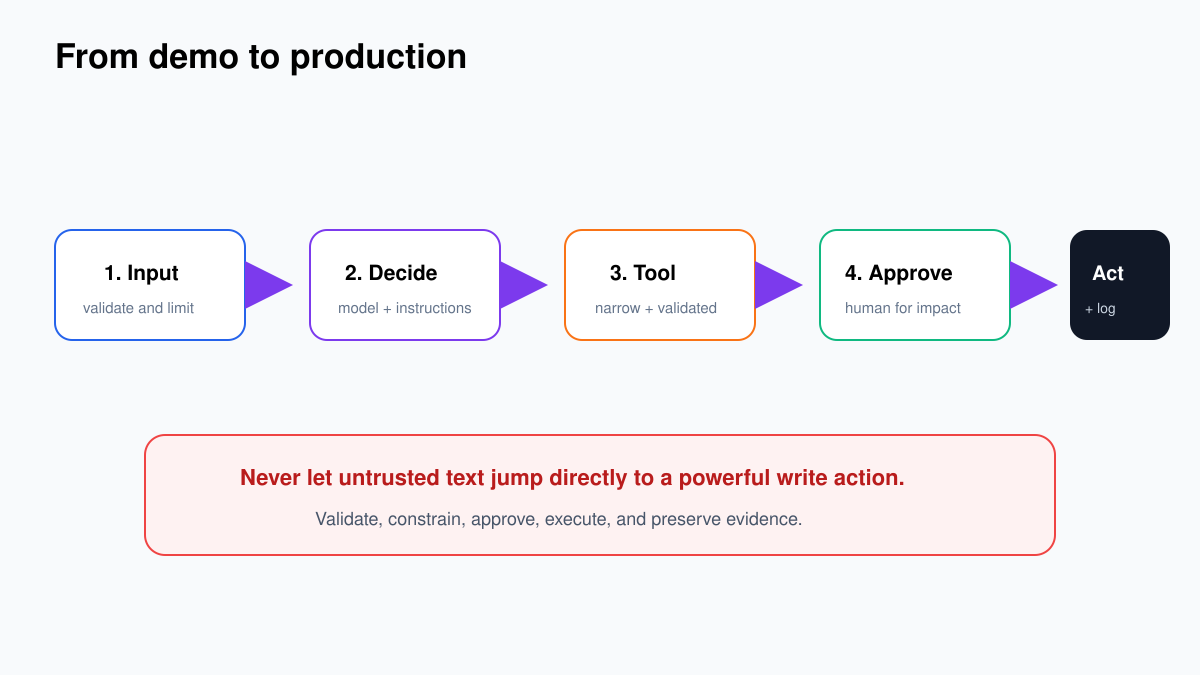
Use Docker Compose without baking secrets into the file
Keep the Compose file in version control, but store secret values in a protected environment file or secrets manager. Pin an n8n version rather than using latest. A minimal outline looks like this:
services:
  postgres:
    image: postgres:16
    restart: unless-stopped
    volumes:
      - postgres_data:/var/lib/postgresql/data
    env_file:
      - .env
    healthcheck:
      test: ["CMD-SHELL", "pg_isready -U $$POSTGRES_USER -d $$POSTGRES_DB"]
      interval: 10s
      timeout: 5s
      retries: 10

  n8n:
    image: docker.n8n.io/n8nio/n8n:<PINNED_VERSION>
    restart: unless-stopped
    env_file:
      - .env
    environment:
      - DB_TYPE=postgresdb
      - DB_POSTGRESDB_HOST=postgres
      - N8N_PROTOCOL=https
      - N8N_HOST=automation.example.com
      - WEBHOOK_URL=https://automation.example.com/
      - GENERIC_TIMEZONE=Asia/Singapore
      - N8N_ENFORCE_SETTINGS_FILE_PERMISSIONS=true
    volumes:
      - n8n_data:/home/node/.n8n
    depends_on:
      postgres:
        condition: service_healthy

volumes:
  postgres_data:
  n8n_data:
Replace <PINNED_VERSION> with a version you have tested. Do not paste this outline into production unchanged: add your proxy network, resource limits, logging, database credentials, encryption key, and organization-specific controls.
The child tutorial Install n8n with Docker Compose covers the exact files, commands, first start, health checks, and upgrade routine.
Set the public URLs correctly
A surprisingly large number of broken self-hosted installations are URL problems. The editor loads, but OAuth callbacks point to localhost or production webhooks advertise an internal address.
N8N_HOSTshould be the public hostname.N8N_PROTOCOLshould behttpsbehind a TLS endpoint.WEBHOOK_URLshould be the externally reachable base URL with the correct scheme and trailing slash.- The reverse proxy must forward the expected host and protocol headers.
Test three things from outside the private network: editor login, one production webhook, and one OAuth callback. A successful home page is not enough.
Protect the editor and reduce the exposed surface
The n8n editor can reveal workflows, credentials metadata, execution data, and powerful actions. Do not leave it as an anonymous public admin surface.
- Use HTTPS only and redirect plain HTTP.
- Restrict editor access with identity-aware proxy, VPN, private network, or an allow-list where practical.
- Give each person their own account; do not share an admin login.
- Review project and credential sharing after role changes.
- Expose only the webhook paths that external systems require.
- Apply request-size and rate limits at the proxy.
- Patch n8n and the base operating system promptly.
- Do not expose PostgreSQL or Redis to the public internet.
Webhook authentication still matters even when the server is behind HTTPS. Use Header, Basic, or JWT authentication when the caller supports it, validate payloads, and store an event ID to stop duplicate writes.
Credentials depend on the encryption key
n8n stores credential data encrypted in its database. A custom N8N_ENCRYPTION_KEY must remain stable across restarts and restores. Losing it can leave you with a database backup whose credentials cannot be decrypted.
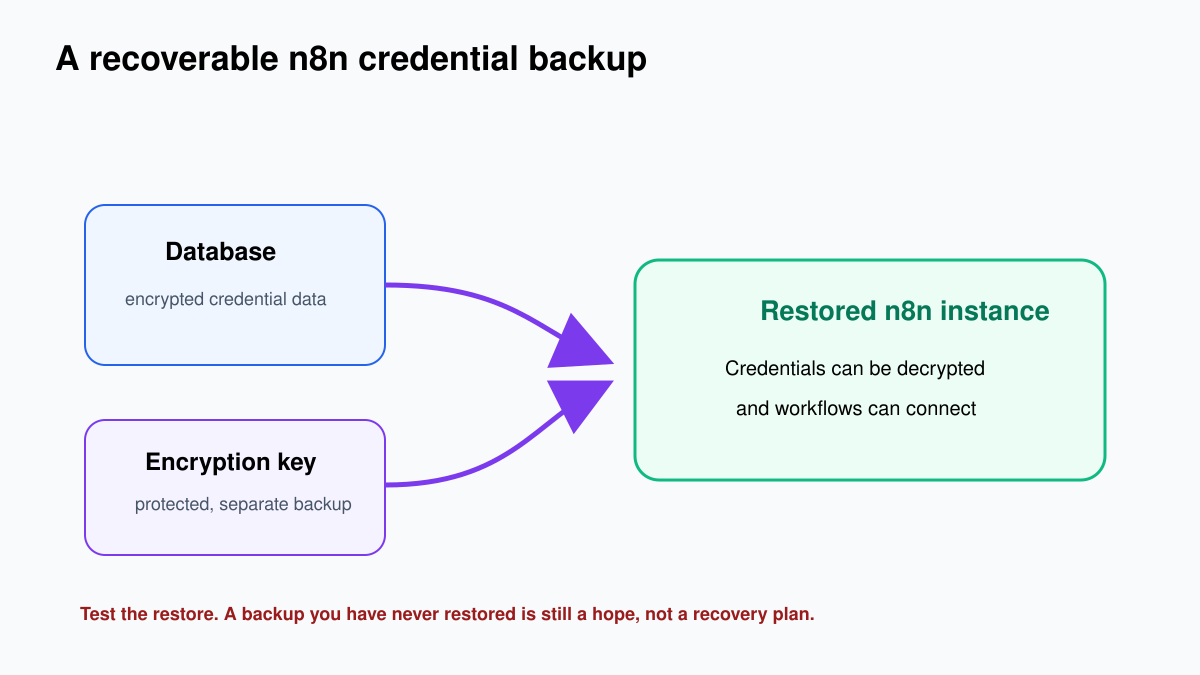
Generate and store the key using your organization’s secrets process. Do not email it, commit it, place it in screenshots, or log it. Limit who can retrieve it and record legitimate access. If you rotate encryption keys, follow n8n’s documented rotation procedure and test recovery before removing the old key material.
For credential design inside workflows, use the n8n credentials and API keys guide.
Back up what you can actually restore
A production backup plan needs four parts:
- PostgreSQL backup: scheduled, encrypted, monitored, and copied off the application host.
- Encryption key backup: protected separately with controlled recovery access.
- Configuration backup: Compose file, proxy configuration, non-secret environment template, version number, and operating instructions.
- Restore test: a clean environment where you restore the database and key, log in, decrypt a credential, open a workflow, and run a harmless test.
Define recovery objectives in plain numbers. For example: lose no more than one hour of data (RPO) and restore service within four hours (RTO). Your backup frequency, database method, and staffing must support those numbers.
A backup job showing “success” proves only that a file was created. A restore test proves whether the file, key, procedure, and people can recover the service.
The full checklist is in n8n backup, restore, and version control.
Upgrade with a rollback plan
Do not pull a new image directly into the only production instance. Use a simple change sequence:
- Read the n8n release notes and migration warnings.
- Record the current image version and configuration.
- Take a fresh database backup and verify it.
- Test the new version against a restored copy or staging environment.
- Run smoke tests for login, credentials, webhooks, schedules, queue/workers, and the most important integrations.
- Deploy during a controlled window and watch errors and executions.
- Rollback to the documented previous version and database state if acceptance tests fail.
Be careful with database migrations: reverting the container image may not be enough if the database schema has changed. That is why the pre-upgrade backup and tested recovery process are connected.
Know when to add queue mode
Queue mode separates the main n8n instance from worker processes and uses Redis to distribute executions. It helps when you need multiple workers, controlled concurrency, or isolation between webhook handling and execution work.
It also creates new failure modes: Redis availability, worker health, shared encryption key, shared database, consistent binary-data storage, backlog growth, and graceful worker shutdown during upgrades.
Before enabling it, measure execution rate, duration, concurrency, memory, and failure patterns. After enabling it, monitor queue depth, oldest waiting job, active workers, execution latency, retries, and dead or repeatedly failing work. Do not use Simple Memory for AI conversations in queue mode; use a shared store such as Postgres Chat Memory.
Continue with Scale n8n with queue mode and workers.
Monitoring that catches real problems
A green HTTP check is useful, but not sufficient. Monitor:
- external HTTPS availability and certificate expiry;
- failed and long-running executions;
- scheduled workflows that did not run;
- webhook response latency and error rate;
- database connections, size, backup age, and disk;
- container restarts, CPU, memory, and filesystem capacity;
- queue depth and worker count when applicable;
- provider rate limits and authentication failures.
Every alert needs an owner and a first action. “Execution failed” without the workflow, execution ID, error class, and runbook link simply wakes someone up to begin searching.
Production readiness checklist
- A named owner is responsible for the platform.
- Versions are pinned and upgrades are tested.
- TLS is valid and the editor is access-controlled.
- PostgreSQL and Redis are not publicly exposed.
- A custom encryption key is protected and backed up.
- Database backups run off-host and are monitored.
- A clean restore, including credential decryption, has succeeded recently.
- Production webhook URLs and OAuth callbacks have been tested externally.
- Critical workflows have validation, idempotency, timeout, and failure routes.
- Monitoring covers application, executions, database, infrastructure, and certificates.
- Logs avoid secrets and unnecessary personal data.
- An incident runbook explains disablement, recovery, and escalation.
Self-hosting is worthwhile when these controls buy you something important: private connectivity, data-location control, custom capacity, or operating flexibility. If they are merely chores nobody wants to own, managed hosting is not a compromise. It is the more reliable design.