Building n8n AI agents is easy. Building one you can trust is mostly architecture. The model is only one component. A useful agent also needs a controlled trigger, clear instructions, narrow tools, the right kind of memory, validated output, approval before risky actions, and a failure path that does not quietly lose work.
This guide designs one realistic example from end to end: a support-triage agent that reads a customer message, checks the customer record, searches approved help content, drafts a response, and sends that draft to a person for approval. It does not send messages or issue refunds by itself.
← Return to the complete n8n AI agents guide
The design in one sentence
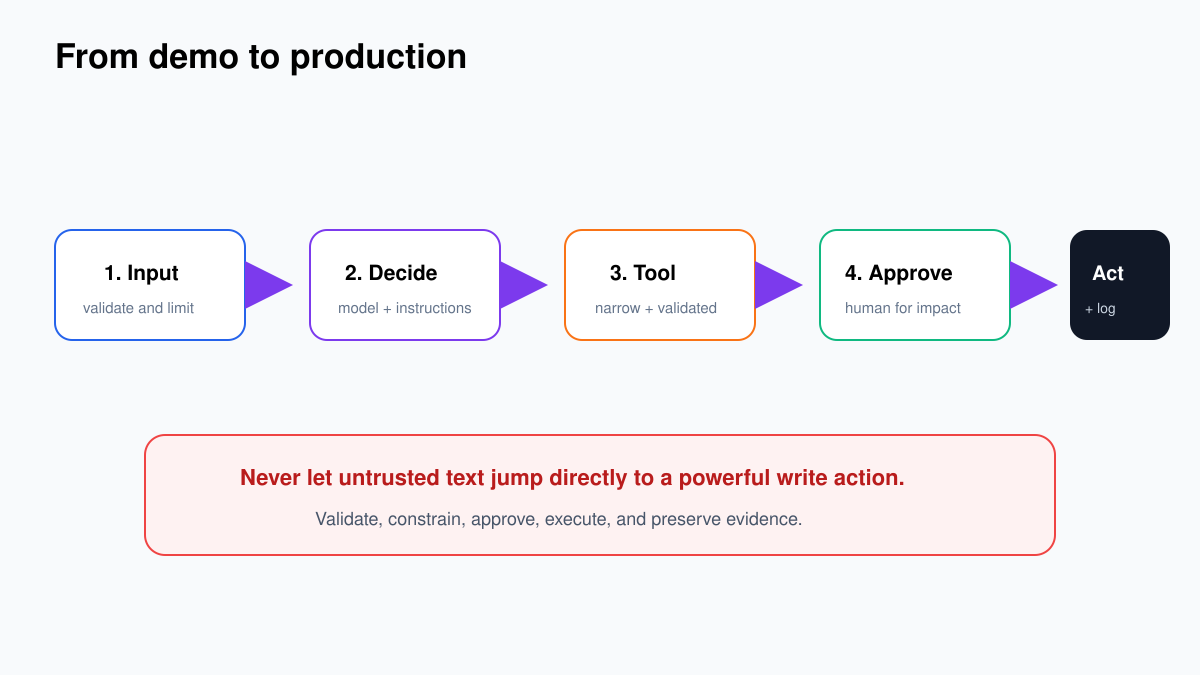
Let AI interpret and draft; let ordinary n8n nodes validate, approve, execute, and log.
Start with a workflow contract, not a prompt
Before opening n8n, write down what the workflow accepts and what it is allowed to change. Otherwise the prompt becomes a vague job description and every new edge case gets patched into it.
| Contract field | Support-agent example |
|---|---|
| Input | ticketId, customerEmail, subject, message, and optional attachment text |
| Outcome | A classified ticket, evidence-backed draft reply, and reviewer decision |
| Read access | Customer tier, open orders, product documentation, approved policy articles |
| Write access | Create an internal review task and, only after approval, add the approved reply |
| Forbidden | Refunds, account changes, deleting tickets, sending unapproved messages |
| Escalation | Security, legal threat, angry VIP, uncertain identity, refund request, or confidence below 0.75 |
| Evidence | Input ID, tool calls, sources used, draft, reviewer, final action, timestamps |
This contract decides the architecture. Because sending is consequential, the agent receives a tool to prepare a draft, not a tool that can email anyone. A normal n8n branch handles approval and the final action.
The seven components of a production-minded agent
| Component | Job | Common mistake |
|---|---|---|
| Trigger | Starts one execution with a known input contract | Accepting incomplete or untrusted fields |
| AI Agent | Interprets the request and chooses allowed tools | Giving it an open-ended role |
| Chat model | Performs reasoning and language generation | Using an expensive model for every case |
| Tools | Expose small read or preparation actions | One broad tool with powerful write access |
| Memory or retrieval | Provides conversation context or approved knowledge | Treating chat history as a database |
| Output parser | Forces fields that downstream nodes can validate | Passing free-form prose into business logic |
| Approval and error path | Stops unsafe actions and preserves failed work | Adding both only after the first incident |
Build the outer workflow first
For the support example, create the predictable route before adding AI:
- Trigger: Webhook, help-desk trigger, or Execute Workflow Trigger receives the ticket.
- Edit Fields – Normalize Ticket: keep only the required fields and trim whitespace.
- If – Required Fields Present? reject or quarantine anything without
ticketId,customerEmail, ormessage. - Data lookup: retrieve the customer using a deterministic node or sub-workflow.
- AI Agent: classify the issue, choose read tools, and draft a response.
- If – Valid Agent Output? confirm allowed category, confidence range, draft length, and required evidence.
- Approval: send the draft and evidence to a reviewer.
- Final action: add the approved reply or route rejected drafts back for editing.
- Audit log: store IDs, decisions, tool results, reviewer, and timestamps.
Why fetch the customer before the agent? Because an exact email lookup is not a decision. Ordinary nodes are cheaper and easier to debug. Reserve the agent for the parts that genuinely need interpretation: intent, urgency, which knowledge tool is relevant, and how to draft a useful answer.
Configure the AI Agent node with narrow instructions
Add an AI Agent node and connect a supported chat model. Current n8n versions use the tools-agent pattern, so the agent needs a chat model and at least one tool. Old tutorials that ask you to select among several agent types are out of date.
Your system message should define role, evidence, limits, and exit conditions. For example:
You are a support triage assistant.

Use only the connected tools and the ticket/customer data provided.
Never invent policy, account status, order status, or a source.
Do not send messages, issue refunds, or change customer data.

Return one structured result with:
- category
- urgency
- confidence from 0 to 1
- summary
- draftReply
- sourceIds
- requiresHumanReview
- reviewReason

Set requiresHumanReview to true for security, legal threats,
refunds, identity uncertainty, VIP anger, missing evidence,
or confidence below 0.75.
This is intentionally shorter than many “master prompts.” Reliability comes from the surrounding controls, not from asking the model to remember 60 rules hidden inside a wall of text.
Design tools as small business capabilities
A tool description tells the model when a tool is relevant. The tool’s input schema controls what the model may supply. Both deserve the same care as an API contract.
For this agent, start with three tools:
| Tool | Inputs | Returns | Why it is safe |
|---|---|---|---|
| Find Customer | Verified email | Customer ID, tier, status | Read-only and returns limited fields |
| Search Help Content | Short query and product | Top passages with source IDs | Reads only approved material |
| Prepare Review Task | Ticket ID, draft, sources, risk reason | Proposed task object | Prepares data; does not message the customer |
Use Call n8n Workflow Tool when a capability needs several nodes. The child workflow begins with Execute Sub-workflow Trigger, defines typed inputs, performs the work, and returns the last node’s output. Publish the child workflow before a production agent calls it.
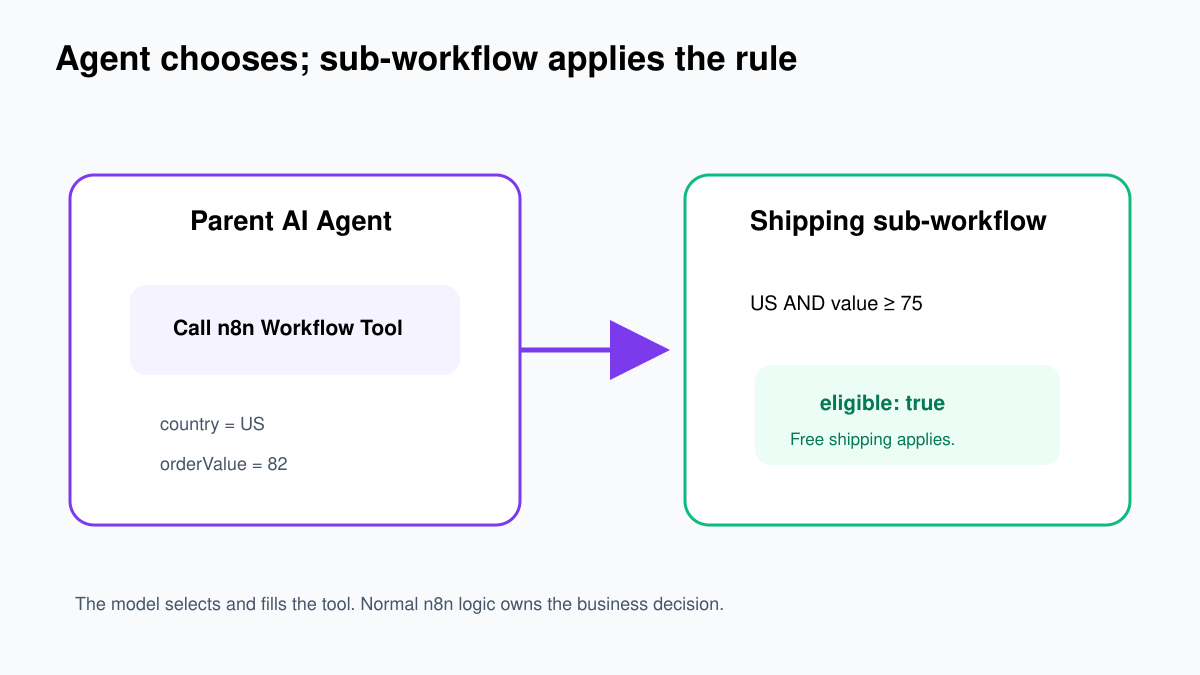
Avoid descriptions such as “manage customer” or “handle tickets.” Prefer “Find one customer by verified email; read-only” and “Prepare an internal review task; never send externally.” If a tool can read and write, split it into two tools and keep the write tool outside the agent whenever possible.
The detailed n8n AI agent tools tutorial shows the exact parent and child nodes, typed inputs, $fromAI() expressions, expected output, and tests.
Choose memory, retrieval, and durable state separately
These three things are often mixed together, but they solve different problems:
- Conversation memory keeps recent turns coherent: “What did I ask two messages ago?”
- Retrieval finds relevant passages from policies, manuals, or approved help content.
- Durable state stores ticket status, customer ID, approval result, and other business facts in a database or application.
Do not trust chat memory as the system of record. A customer’s verified tier should come from the CRM every time it affects a decision. Do not place an entire policy manual in conversation memory. Retrieve the relevant passages and return their source IDs.
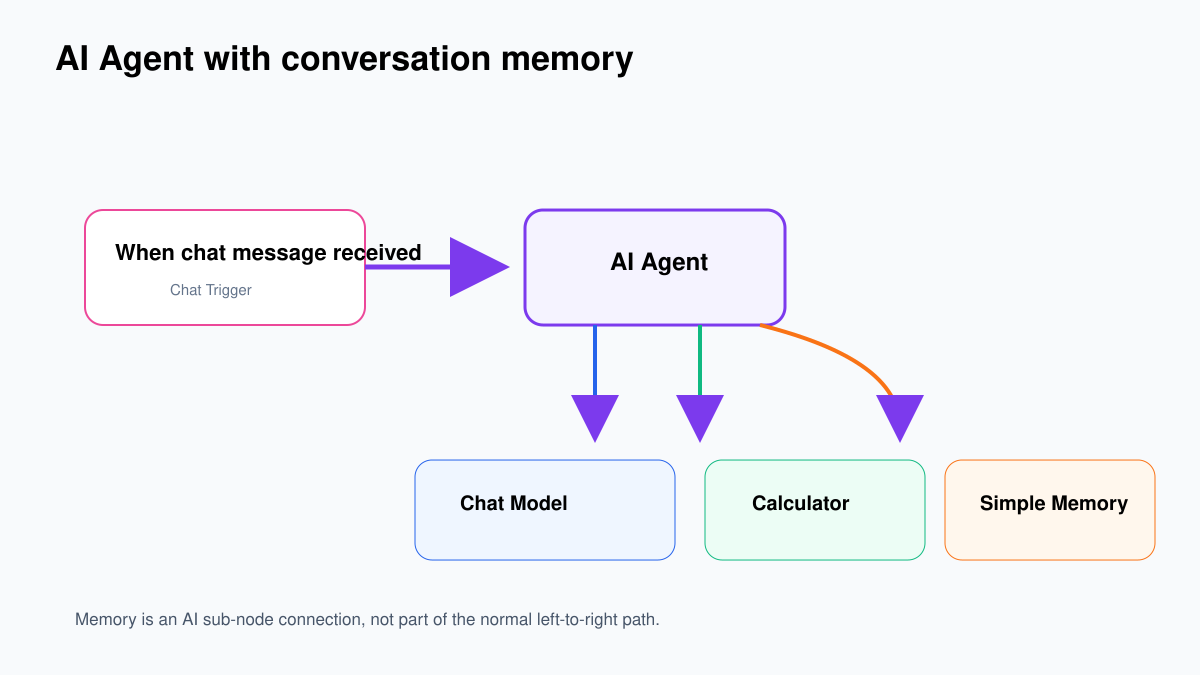
Use Simple Memory only for learning or a single n8n process. n8n warns against using it in queue mode. For multi-worker production, use a shared memory store such as Postgres Chat Memory and apply retention and deletion rules. The n8n AI agent memory tutorial includes the exact same-session and isolation tests.
Make the agent return structured, testable output
Free-form prose is pleasant for humans and awkward for workflows. Connect a Structured Output Parser and require a schema like this:
{
  "type": "object",
  "properties": {
    "category": {"type": "string", "enum": ["billing", "technical", "account", "other"]},
    "urgency": {"type": "string", "enum": ["low", "normal", "high"]},
    "confidence": {"type": "number", "minimum": 0, "maximum": 1},
    "summary": {"type": "string"},
    "draftReply": {"type": "string"},
    "sourceIds": {"type": "array", "items": {"type": "string"}},
    "requiresHumanReview": {"type": "boolean"},
    "reviewReason": {"type": "string"}
  },
  "required": ["category", "urgency", "confidence", "summary", "draftReply", "sourceIds", "requiresHumanReview", "reviewReason"]
}
A schema improves shape, not truth. The next ordinary nodes must still check the values: category belongs to the allow-list, confidence is in range, source IDs exist, the draft is not empty, and risky keywords or conditions force review.
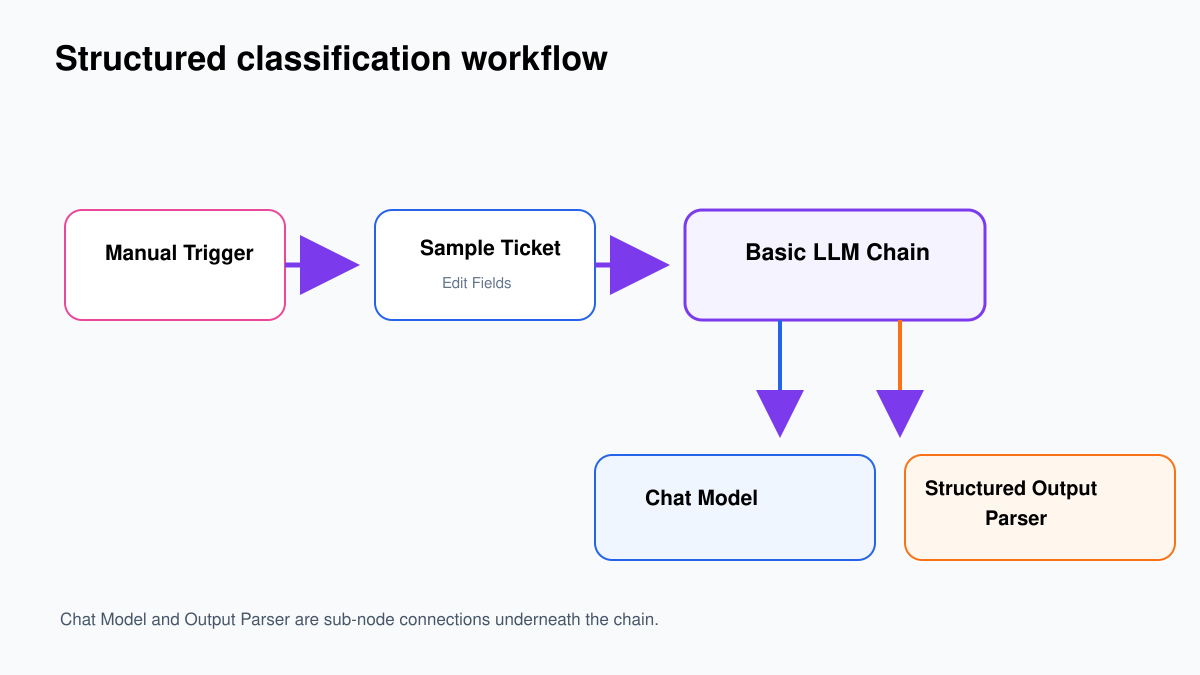
Follow the structured output parser tutorial for the exact node connections, schema entry, expected JSON, and routing tests.
Keep approval outside the agent
The agent should not decide whether its own risky action is acceptable. Route the structured result through an If or Switch node. If requiresHumanReview is true—or your deterministic checks find a risk—create an approval task containing:
- the original customer request;
- the customer record fields used;
- the draft reply;
- source titles or IDs;
- the model’s category, confidence, and reason;
- Approve, Reject, and Edit choices.
After approval, revalidate the ticket ID and approved text before the final help-desk node runs. This protects against stale approvals and accidental edits to the wrong record. Record who approved it and which content was actually sent.
Failure paths are part of the workflow
Design failures while the canvas is still simple:
| Failure | Expected behavior |
|---|---|
| Missing required input | Return a controlled validation error; do not call the model |
| Customer not found | Route to manual identity check |
| Tool timeout | Retry only safe reads with limits and backoff |
| Parser failure | Capture raw output and route to review; never guess fields |
| No approved source | Draft a clarification or escalate; do not invent policy |
| Duplicate ticket event | Stop using a stored event or ticket-version key |
| Model rate limit | Queue or retry with a cap, then alert |
| Approval expires | Re-open review instead of executing an old decision |
Log enough to reproduce the decision without logging secrets or unnecessary personal data. At minimum, keep the workflow version, model name, prompt version, input ID, tool names, source IDs, structured result, validation outcome, approval, final action, latency, and cost estimate.
A practical test pack before activation
- A normal technical question with one clear source.
- A message missing the customer email.
- A refund request that must require review.
- A message containing instructions such as “ignore your rules.”
- An angry VIP message with ambiguous identity.
- A knowledge search that returns no result.
- A tool timeout.
- The same event delivered twice.
- Two different users with different session keys.
- A deliberately malformed model response.
For each case, write the expected branch and final side effect before running it. “The workflow completed” is not a test result. “No external message was sent; one review task was created with source ID KB-142” is.
Continue with the detailed component tutorials
- Build your first n8n AI agent
- Build and test an n8n workflow tool
- Configure AI agent memory and session isolation
- Force structured output with a JSON Schema
- Add human approval before consequential actions
- Use the n8n AI agent security checklist
- Test and evaluate AI workflows