Updated October 4, 2026
An always-on AI agent needs more context and access than an ordinary chatbot. That is why OpenAI Dots privacy cannot be reduced to a single “Is it safe?” answer. You need to understand app permissions, retained context, shared memory, cloud computers, training settings, approvals and what happens after you disconnect a service.
This guide separates the product’s safeguards from the decisions you still own. It is based on OpenAI’s current documentation and should be treated as a dated product analysis, not legal or security advice.
OpenAI Dots privacy at a glance
| Question | Current answer |
|---|---|
| Does a Dot use existing plugins? | Yes, within permissions shared with ChatGPT, ChatGPT Work and Codex |
| Does it share memory with ChatGPT? | Yes; memory and recent conversation context can move between them |
| Does disconnecting an app erase learned context? | No; it stops new access but does not remove information already retained |
| Can you delete one individual Dot memory? | Not currently; you can delete the Dot’s context by deleting the Dot |
| Is business data used for training? | Not by default for Business, Enterprise and Edu workspaces |
| Can proactive research send or edit? | No; its tools are restricted from messaging, changing app content and controlling browsers or computers |
For features and use cases, begin with OpenAI Dots explained. This page focuses only on privacy, security and control.
1. Each Dot has a separate cloud computer
A Dot normally works in its own maintained Linux environment with a Chrome browser. OpenAI says user cloud environments are isolated and sandboxing restricts the code and tools available. The work environment is also separated from the systems that enforce key safety checks.
Your own computer is not automatically part of that environment. Connecting it is optional and should be treated as a separate risk decision. If the job only needs a connected cloud folder, do not grant local-device access.
2. Plugin access is shared
Connections and permissions can be shared across Dots, ChatGPT, ChatGPT Work and Codex. A service you connected months ago for a different purpose may therefore be available to the Dot within the granted permissions.
- Inventory connected apps before setup.
- Remove services no longer needed.
- Restrict folders, labels, projects or accounts where the integration supports it.
- Use a dedicated account for a narrow business workflow where practical.
- Review the app’s own audit and retention settings.
3. Disconnecting is not deletion
Disconnecting a plugin stops new information from flowing through that connection. It does not remove information the Dot already incorporated into its context. This distinction matters when an employee changes role, a project ends or a connected folder was broader than intended.
OpenAI currently says you cannot view, edit or delete an individual detail inside the Dot’s retained context. Deleting the Dot removes its context, but separately stored files, ChatGPT conversations, Codex threads and ChatGPT memories follow their own controls.
4. ChatGPT Memory and Dot context interact
A Dot can receive ChatGPT memories and recent conversation context, and Dot conversations can contribute to ChatGPT Memory. Turning off Memory stops future sharing but does not delete information already received.
Before using a Dot for a sensitive business task, review ChatGPT Memory and avoid mixing personal and corporate context in the same workflow. If the task needs a clean boundary, use the appropriate managed workspace and dedicated sources.
5. Training settings depend on the plan
OpenAI says content from Business, Enterprise and Edu workspaces is not used to train models by default. On personal plans, the “Improve the model for everyone” setting controls whether eligible Dot conversations and work may be used. This can include actions, delegated work, automations and connected-app data brought into eligible conversations.
Proactive research threads and their private notes are not trained on directly. If a finding is later brought into an eligible conversation or task, that information may become eligible depending on the setting.
6. Proactive research is read-only—but follow-up may not be
In proactive research, the Dot may read permitted connected sources and save private notes. OpenAI says those background tools cannot directly send messages, change connected content or control a browser or computer.
The Dot can use what it learned to propose follow-up work. That next action follows the normal permission, Custom Rule and Auto-review path. Do not confuse a read-only discovery phase with a permanently read-only agent.
7. Secure sign-in protects passwords, not every secret
For supported sign-ins, the model pauses while credentials go directly to the browser environment. Saved-password flows use a separate encrypted credential service, keeping the password outside the model’s context.
This protection does not apply to a password, API key or secret pasted into an ordinary message or readable document. Never use a prompt as a credential store.
8. Prompt injection remains a real risk
A webpage, email or document can contain instructions intended to redirect the agent or extract information. OpenAI combines model safeguards, tool restrictions, action checks and monitoring, but explicitly states that these measures reduce rather than eliminate risk.
- Treat retrieved content as data, not authority.
- Do not allow an agent to read untrusted content and immediately perform high-impact actions.
- Use source allowlists for recurring research.
- Require approval before external sharing or account changes.
- Test a page containing “ignore previous instructions” before launch.
9. Approval is not the same as recovery
Custom Rules and Auto-review can stop or route planned actions. They do not guarantee that a completed action can be reversed. Email recall, document version history, deletion recovery and transaction cancellation depend on the external app.
| Before enabling an action | Question |
|---|---|
| Logging | Can you see the input, proposed action, approval and result? |
| Reversal | Can the app undo or restore the action? |
| Revocation | Can you disconnect the app or account quickly? |
| Notification | Who learns that the action failed or caused harm? |
| Ownership | Who decides whether to stop the Dot? |
The AI agent security checklist covers the full operating model, including kill switches, logs, abuse testing and incident rehearsal.
A privacy-first first-week configuration
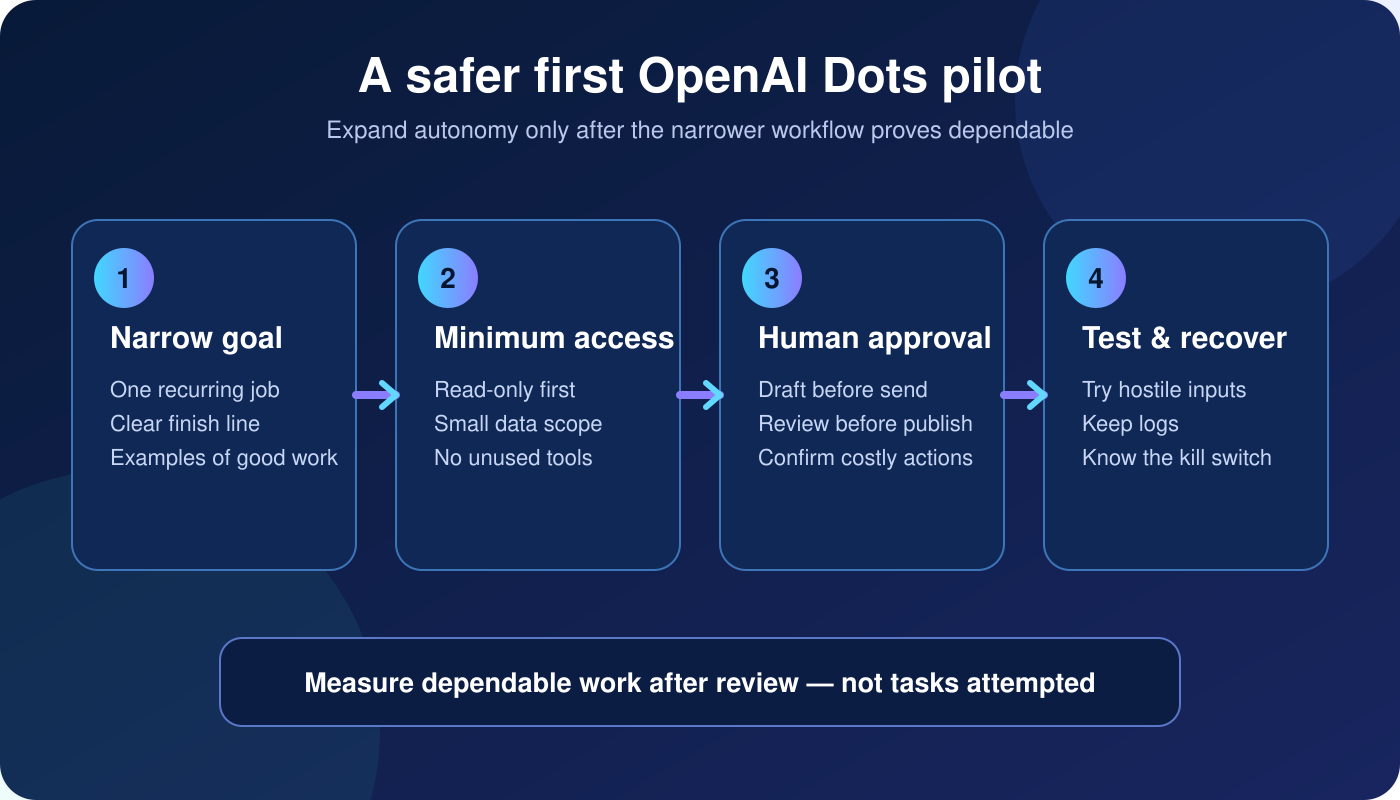
- Use one defined task and one owner.
- Review existing plugins and remove stale access.
- Connect only a narrow, preferably read-only source.
- Do not connect the local computer unless required.
- Write allow, approval and block rules using named actions.
- Inspect Activity View during every early run.
- Test prompt injection, conflicting data and forbidden actions.
- Record how to disconnect access and delete the Dot’s context.
For exact templates, use the OpenAI Dots Custom Rules guide. For initial configuration, follow the step-by-step OpenAI Dots setup guide.
The practical verdict
OpenAI has built several meaningful safeguards: isolated cloud workspaces, secure sign-in, restricted proactive research, Custom Rules, Auto-review and monitoring. The remaining risk comes from a familiar source—giving a capable system more information and authority than the job requires.
Start with less access than you think you need. A useful read-only brief is a successful first Dot. An agent with broad permissions is not more advanced if nobody can explain what it remembers, what it may do or how to recover from a mistake.
Frequently asked questions
Does disconnecting a plugin delete what a Dot remembers?
No. Disconnecting stops new access, but information already incorporated into the Dot context can remain.
Can I delete one specific Dot memory?
Not currently. Deleting the Dot removes its own context; separately stored conversations, files and ChatGPT memories use their own controls.
Does OpenAI train on business Dots data?
Business, Enterprise and Edu workspace content is not used for model training by default.
Sources
- OpenAI: Safety, security and privacy in Dots
- OpenAI Help: Dots privacy, security and safety FAQs
- OpenAI: Introducing Dots
About the author: Nishikant Tiwari is a computer engineer who writes practical, evidence-based guides on AI tools, automation and personal productivity.