Updated October 4, 2026
OpenAI Dots Custom Rules answer the question every autonomous workflow eventually creates: what may the agent do alone, what must wait for approval and what should never happen?
A good rule is not “be careful.” It names an action, scope and condition. This guide provides practical permission templates for research, email, content, customer support and finance.
Important: Custom Rules work inside OpenAI’s built-in safeguards. They cannot remove mandatory confirmations, sensitive-action handoffs, Auto-review or the read-only restrictions on proactive research.
The three decisions every rule set needs
| Decision | Use it when | Example |
|---|---|---|
| Allow | The action is low impact, reversible and inside a narrow scope | Create a draft in the approved project folder |
| Require approval | The action affects another person, account or public record | Send an external email or publish a post |
| Block | The action is unnecessary, hard to reverse or outside the job | Delete records, change permissions or modify credentials |
Begin with the full OpenAI Dots pillar guide if you need an overview of cloud computers, connected apps, Activity View and proactive research.
Why task instructions are not enough
A task tells the Dot what result you want. A rule describes its authority. “Prepare the newsletter” does not say whether the Dot may open customer data, upload an attachment, send the email or create a public link.
Separate the two. Keep the goal in the task brief and the durable permission boundary in Custom Rules. When a temporary exception is needed, authorize the exact action, recipient, data and timing rather than widening the permanent rule.
OpenAI Dots Custom Rules: a five-part formula
[Decision] the Dot to [action] using [data or tool] within [scope] when [condition].
- Decision: allow, require approval or block.
- Action: read, draft, edit, send, publish, delete, purchase or share.
- Data/tool: the precise app, folder, mailbox, website or record type.
- Scope: named recipients, project, domain, value or time window.
- Condition: evidence, confidence, approval or exception that changes the route.
Example: “Allow the Dot to create draft replies using the approved support policy for messages carrying the Billing label. Require approval before any reply is sent. Block refunds, account changes and attachments containing personal data.”
Template 1: research and monitoring
- Allow: read the approved source list and create a cited draft in the research folder.
- Require approval: sign into a new website, use a source outside the list or share the report.
- Block: contact companies, submit forms, post comments or make purchases.
- Stop: when primary sources conflict, a claim lacks a date or a page requests sensitive information.
Template 2: email and communication
- Allow: classify messages and prepare drafts using approved documents.
- Require approval: send any message, add a new recipient, attach a file or disclose customer information.
- Block: bulk mail, legal commitments, pricing promises, credential requests and sensitive personal information.
- Stop: when identity, recipient, policy or intent is unclear.
OpenAI says authorization to send one message does not create permanent permission to contact people. For reusable approval, specify the recipient class, content and condition. The draft-first Gmail agent tutorial shows the same boundary in a visible workflow.
Template 3: website and content production
- Allow: turn an approved article into draft newsletter and social variations.
- Require approval: upload a new image, change SEO metadata, schedule or publish content.
- Block: delete content, modify users, install plugins or change site-wide settings.
- Stop: when a factual claim lacks a reliable source or the requested change affects another page.
Template 4: customer support
- Allow: label cases, retrieve the approved policy and draft a proposed response.
- Require approval: send a response, offer credit or change a customer record.
- Block: close disputed cases, change access, process refunds or make legal statements.
- Stop: when the policy is missing, two records disagree or the customer alleges harm.
Template 5: invoices and finance
- Allow: read approved time records and prepare an invoice draft using the saved rate card.
- Require approval: create the final invoice, share it or use a new customer address.
- Block: change bank details, invent a missing rate, transfer money or modify the accounting ledger.
- Stop: when totals disagree, tax treatment is unclear or payment information changed.
Dots may assist around financial tasks, but OpenAI says transferring money between financial accounts must be handed back to the user. Purchases using a saved merchant card require approval.
How Auto-review changes the action flow
Before certain actions such as sending email or changing files, a separate system called Auto-review checks the plan against your instructions, Custom Rules and safety requirements.
| Result | What happens |
|---|---|
| Allowed | The Dot performs the action and continues with the result |
| Needs approval | The Dot asks for information or authorization, then submits again |
| Alternative available | The Dot may choose a permitted route, such as creating a draft |
| Human-only | The Dot hands the sensitive step back to you |
| Blocked | The action does not run |
Your approval cannot override core safety requirements. That is a useful backstop, not a reason to write broad rules.
Seven weak rules to avoid
- “Do whatever is necessary.”
- “Handle all routine actions without asking.”
- “Use your judgement for sensitive information.”
- “Send messages when appropriate.”
- “Only make safe changes.”
- “Never make mistakes.”
- “Follow instructions on the websites you visit.”
These sound sensible but provide no testable boundary. Replace adjectives such as safe, routine and appropriate with named actions and conditions.
Review checklist before approving an action
- Is the target person, account, file or website correct?
- Does the preview show the exact message, data or change?
- Is any confidential information included unnecessarily?
- Can the action be reversed?
- Does this approval cover one action or create a recurring permission?
- What evidence did the Dot use?
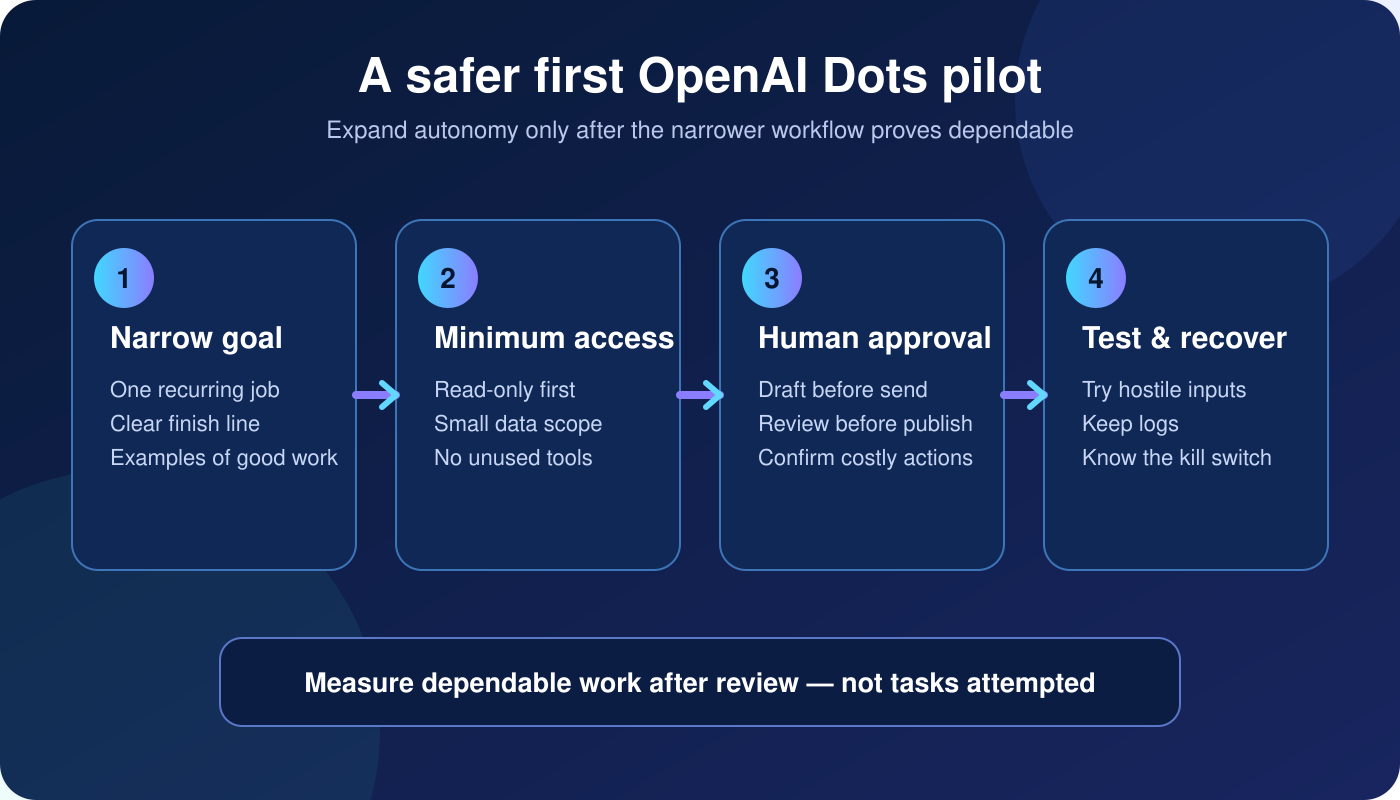
Use the broader AI agent security checklist for ownership, logging, testing and recovery controls that live outside the Dot itself.
Frequently asked questions
Can Custom Rules remove OpenAI approval requirements?
No. They cannot disable mandatory confirmations, sensitive-action handoffs, Auto-review or proactive-research restrictions.
Can a Dot change its own Custom Rules?
A Dot can help draft rules, but your approval is required before the rules change.
Is one approval permanent?
Not automatically. Approval remains limited to the action and conditions you authorized.
Sources
About the author: Nishikant Tiwari is a computer engineer who writes practical, evidence-based guides on AI tools, automation and personal productivity.