The best AI voice generators have become good enough that the real question is no longer “Does it sound robotic?” The harder question is: which tool fits your actual job?
A YouTube narrator, a course creator, a musician and a business building a voice agent need very different things. One tool may sound wonderfully expressive but offer weak editing. Another may be less dramatic yet save hours because it combines voice, video and team review in one place.
I compared 13 popular AI voice platforms using the factors that matter after the first impressive demo: voice quality, pronunciation control, Indian and multilingual support, editing workflow, downloads, commercial rights and pricing. Prices and limits were checked in September 2026, but AI companies change plans frequently, so confirm the live plan before paying.
Editorial note: No company paid for placement in this guide. Product screenshots were captured from the vendors’ official websites.
Best AI voice generators: the short answer
| Tool | Best for | Free option | Paid starting point* |
|---|---|---|---|
| ElevenLabs | Best overall voice quality and cloning | Yes | $6/month |
| LOVO Genny | Multi-speaker voiceovers and video | Trial/free access | Check live pricing |
| PlayHT | Expressive voices, API and real-time speech | Limited access | Check live pricing |
| Synthesys | Voice plus avatar/video production | Demo access | $29/month |
| Speechify Studio | Accessible narration and document-to-audio | Yes | $19/month |
| Murf AI | Business, training and e-learning voiceovers | 10-minute trial | $19/month, annual billing |
| DupDub | All-in-one social content localization | Trial | Credit-based plans |
| Animaker Voice | Free voice generation and video workflows | 15 minutes/month | $15/month, annual billing |
| Kits AI | Singing voices and music production | Yes | $10/month |
| WellSaid | Controlled corporate narration | Trial | $49/month |
| Uberduck | Rap, remix and creative experiments | Yes | $5/month for commercial Creator plan, annual billing |
| NaturalReader | Documents, accessibility and commercial narration | Personal free version | $29/month commercial |
| Listnr | Podcast and article-to-audio workflows | Yes | Check live pricing |
*Prices shown are the lowest relevant public entry points I found, excluding enterprise plans, taxes and temporary discounts. Some annual plans display an equivalent monthly price but charge for the full year.
My practical winners
- Best overall: ElevenLabs
- Best for business presentations and courses: Murf AI
- Best for listening to PDFs and articles: Speechify
- Best free starting point: Animaker Voice
- Best for music and vocals: Kits AI
- Best for tightly controlled corporate narration: WellSaid
- Best for multi-speaker video projects: LOVO Genny
If you want one recommendation without reading the entire guide, start with ElevenLabs. If your work is mainly corporate training, product demos or presentations, compare it with Murf before paying. Musicians should start with Kits AI rather than forcing a general-purpose narrator to handle vocals.
How I compared the tools
A long voice list is not the same as a useful voice platform. I used seven practical questions:
- Does the voice stay natural across complete paragraphs, not just a ten-second demo?
- Can it pronounce names, abbreviations, Hindi words and technical terms correctly?
- Can I control pauses, speed, emphasis and emotion without editing every sentence?
- Can I regenerate one bad line instead of paying to regenerate the whole script?
- Does it support the language, accent and speaker style I actually need?
- Can I legally use the downloaded audio in monetized videos, client work or advertising?
- Does the pricing unit—characters, credits, minutes or downloads—match my workload?
This last point is often ignored. A plan that looks cheap can become expensive when every preview consumes credits, or when generation is unlimited but downloads are restricted.
1. ElevenLabs — best overall
ElevenLabs remains the safest first choice for creators who care primarily about natural, expressive speech. Its public voice library is unusually broad, and the platform now covers much more than basic text-to-speech: voice design, instant and professional cloning, dubbing, sound effects, music and long-form Studio projects.
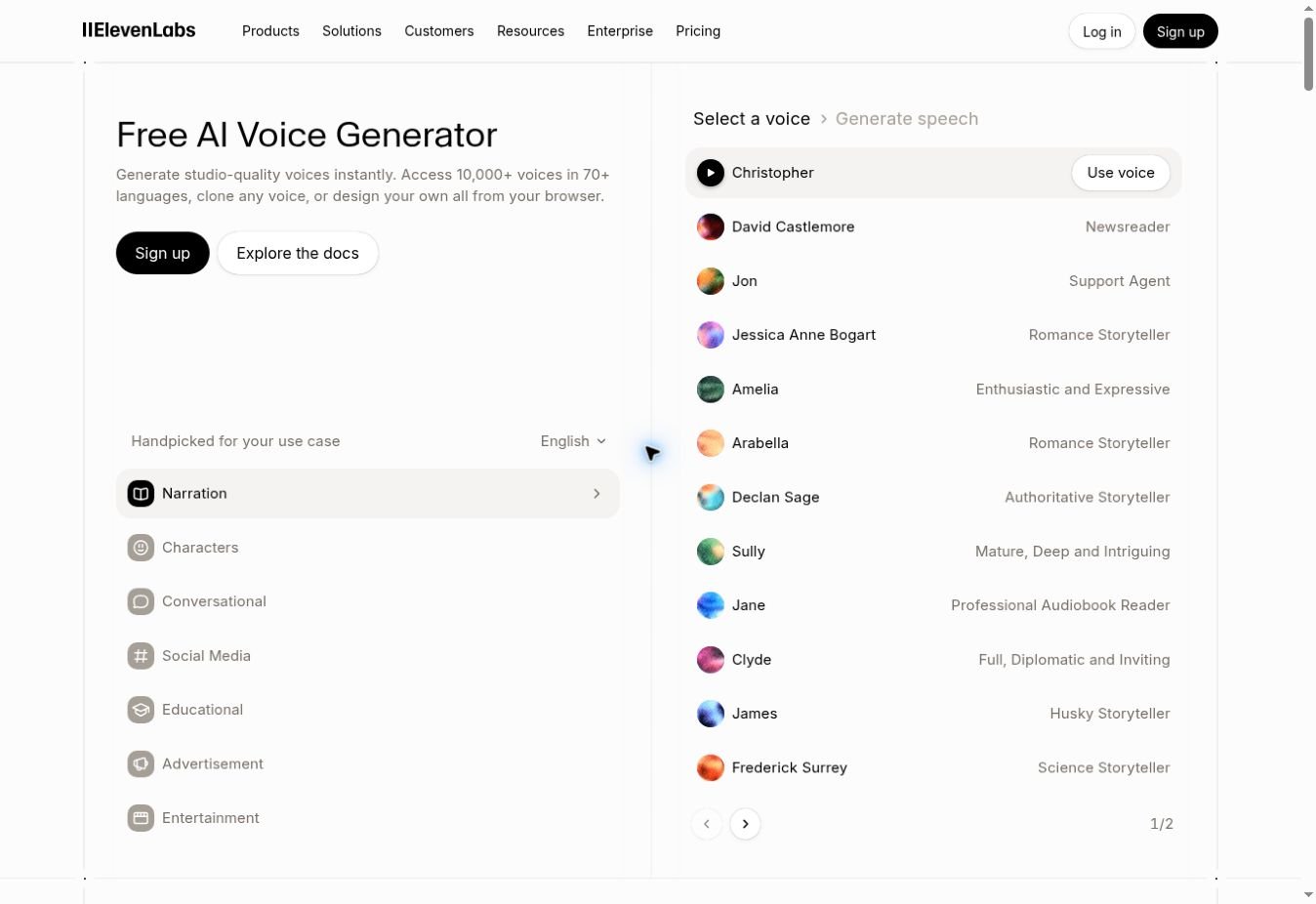
The important advantage is not merely the number of voices. Good voices maintain rhythm across longer passages and respond reasonably well to punctuation, sentence length and delivery instructions. You can also regenerate a weak passage rather than rebuilding an entire production.
What I like: excellent naturalness, strong voice cloning, a large community library, multilingual tools and a mature long-form workflow.
What to watch: outputs can vary between generations, credit usage needs attention, and the free plan is for experimentation rather than commercial publishing. Commercial rights start with the paid Starter plan.
Current pricing: the free plan includes 10,000 monthly credits. Starter is $6/month and adds a commercial licence, instant voice cloning and more Studio projects.
2. LOVO Genny — best for multi-speaker projects
LOVO’s Genny is more of a production studio than a single text box. It combines a large multilingual voice library with multi-speaker scenes, script assistance, images and video editing.
Availability note: LOVO’s official site showed “Deployment Paused” during my final link check on September 22, 2026. I have therefore not added a dead visit link; check the service status before choosing a plan.
This is useful for training videos, explainers, fictional dialogue and podcast-style content where several speakers need to appear in one timeline. You can assign different voices to individual blocks and adjust delivery without moving between several applications.
What I like: 500+ voices across 100 languages, multi-speaker editing, voice cloning and a creator-friendly video workflow.
What to watch: the interface contains many tools, which can feel heavy if you only need a quick MP3. Free access and exports are limited, and plan details change regularly.
Best for: course creators, agencies, narrative videos and teams producing dialogue.
3. PlayHT — best for expressive speech and developers
PlayHT combines a broad voice catalogue with expressive models, real-time speech and API access. It is worth comparing with ElevenLabs when emotion, low-latency generation or application integration matters more than a polished browser studio.
Its controls can vary by model, but may include speed, intensity, similarity and stability. The platform also supports cloning and conversational use cases.
What I like: strong selection of voices and languages, expressive delivery, useful developer options and real-time models.
What to watch: the product and pricing structure can be confusing, and voice-clone quality depends heavily on clean training audio.
Best for: apps, conversational experiences, podcasts and creators who want to experiment with emotion.
4. Synthesys — best voice-and-avatar bundle
Synthesys combines AI voices with avatar video, image generation and multilingual production. It makes more sense when you need a complete presenter video than when you only want narration.
You can assign voices at paragraph level, alter pacing and style, and combine narration with an on-screen presenter. That makes it practical for sales explainers, product demos and localized training content.
What I like: voice, avatars and video in one workflow; multiple speakers; commercial rights included in public paid plans.
What to watch: bundled platforms can cost more than a dedicated voice tool, and output quality may differ across languages and avatars.
Current pricing: public plans start at $29/month for Indie, with Studio and Agency tiers above it.
5. Speechify Studio — best for accessibility and document narration
Speechify started from a different problem: helping people listen to material they would otherwise read. That heritage still makes it one of the strongest options for articles, PDFs, documents, ebooks and accessibility use cases.
For educators and accessibility teams, our guide to text-to-speech tools for teachers explains the classroom use case in more detail.
Speechify Studio adds voiceover, dubbing, avatars and creative tools. It supports a large voice library and many languages, while the reader apps can highlight text as it is spoken.
What I like: excellent document workflow, strong accessibility features, natural cadence and a wide language selection.
What to watch: distinguish the Reader subscription from Studio—their purposes and pricing are different. Also test Indian English and Hindi using your real script; a voice that sounds good in English may not handle code-switching naturally.
Current pricing: Studio has a free tier with limited credits; Studio Starter is listed at $19/month.
6. Murf AI — best for business and e-learning
Murf AI is designed around structured production. Its Studio combines voiceovers, dubbing, media and timing controls, while its API and agent products serve developers and businesses.
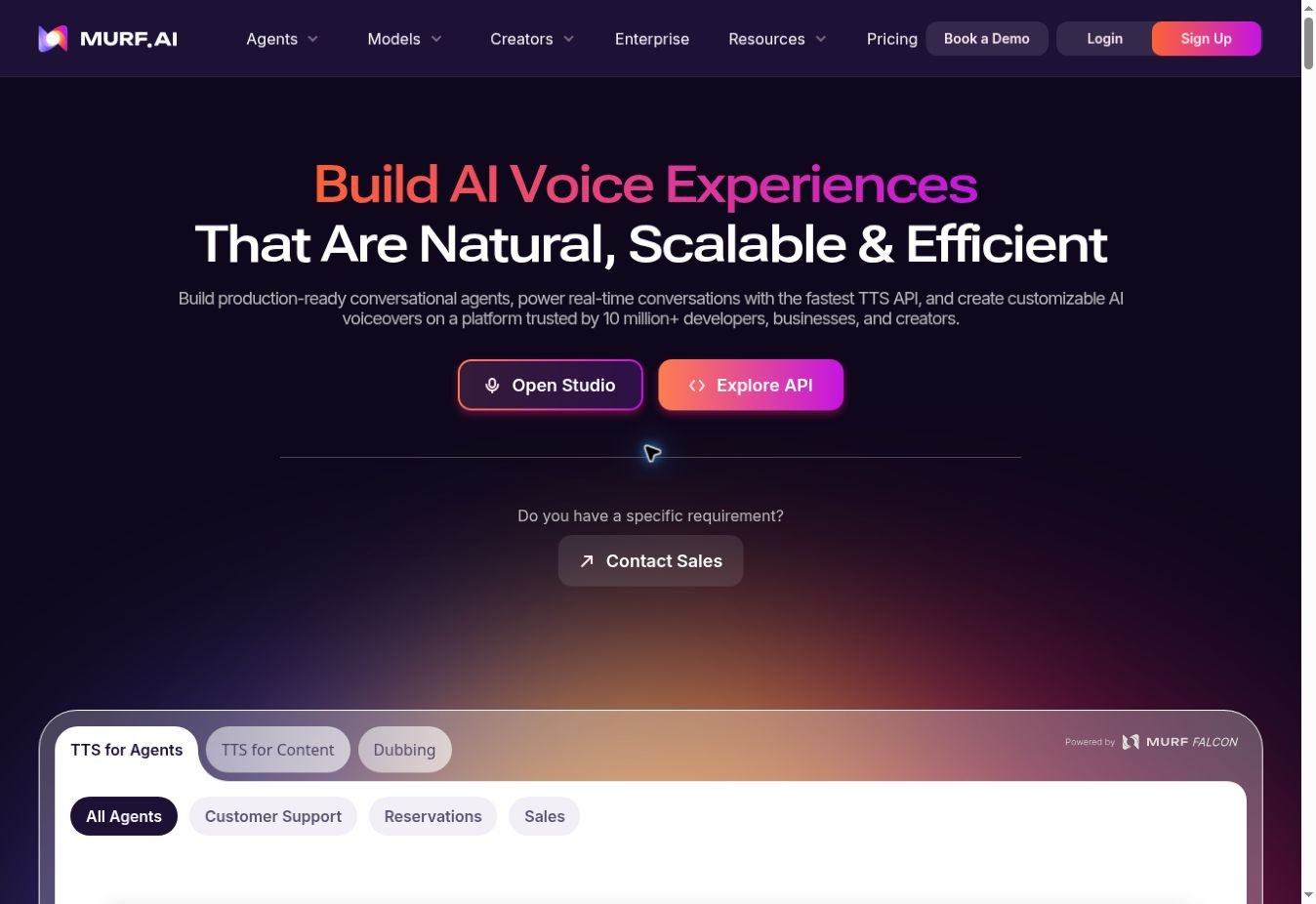
Murf is a good fit when voice must line up with presentation slides, training scenes or a product video. Teams can work in one environment instead of exporting audio repeatedly between tools.
What I like: business-friendly editor, pronunciation and timing controls, stock media options, collaboration and solid e-learning workflows.
What to watch: free-trial audio cannot be downloaded, and generation is commonly sold as a yearly allowance rather than a simple unlimited monthly plan.
Current pricing: the trial includes 10 minutes of voice generation and 10 minutes of transcription. Starter is listed at $19/month when billed annually.
7. DupDub — best all-in-one social content toolkit
DupDub combines text-to-speech with voice cloning, dubbing, transcription, avatars and video tools. It is especially practical for creators turning one script into several languages and formats.
The voice editor includes granular controls for pauses, pronunciation, rhythm, emphasis and background audio. Multi-speaker projects are also supported.
What I like: detailed editing controls, multilingual voices, accurate cloning potential and an unusually broad content toolkit.
What to watch: the credit system takes time to understand, and a limited trial can make large tests difficult. Calculate the cost of your normal five-minute video before committing.
Best for: social media localization, short videos, dubbed content and teams that prefer one bundled platform.
8. Animaker Voice — best free starting point
Animaker Voice is one of the easiest ways to test AI narration without entering a card. The free plan currently includes voice generation and MP3 downloads, which is more useful than a “free” demo that does not let you export anything.
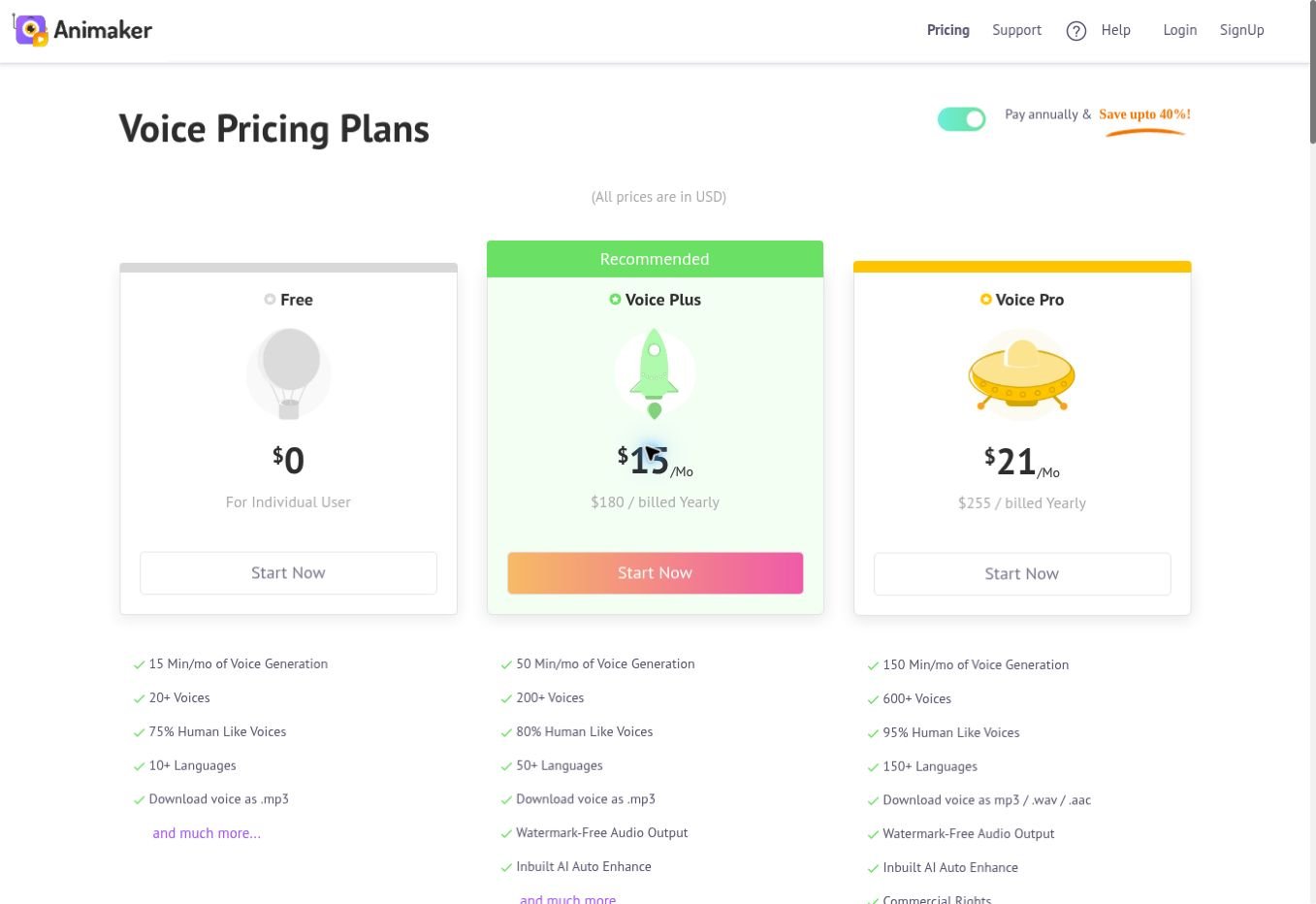
You can add pauses and breaths, change speed and pitch, emphasize words and move the result into Animaker’s broader video workflow.
What I like: usable free plan, straightforward editor, MP3 downloads and convenient integration with animated-video production.
What to watch: the best voices and language coverage sit in paid tiers, and lower-tier voices may sound less natural on emotional scripts.
Current pricing: Free includes 15 minutes/month and 20+ voices. Voice Plus is $15/month billed annually; Voice Pro is $21/month billed annually.
9. Kits AI — best for musicians and singing voices
Kits AI is the specialist in this list. It focuses on singing, vocal conversion, voice design, harmonies, stem tools and music production rather than ordinary corporate narration.
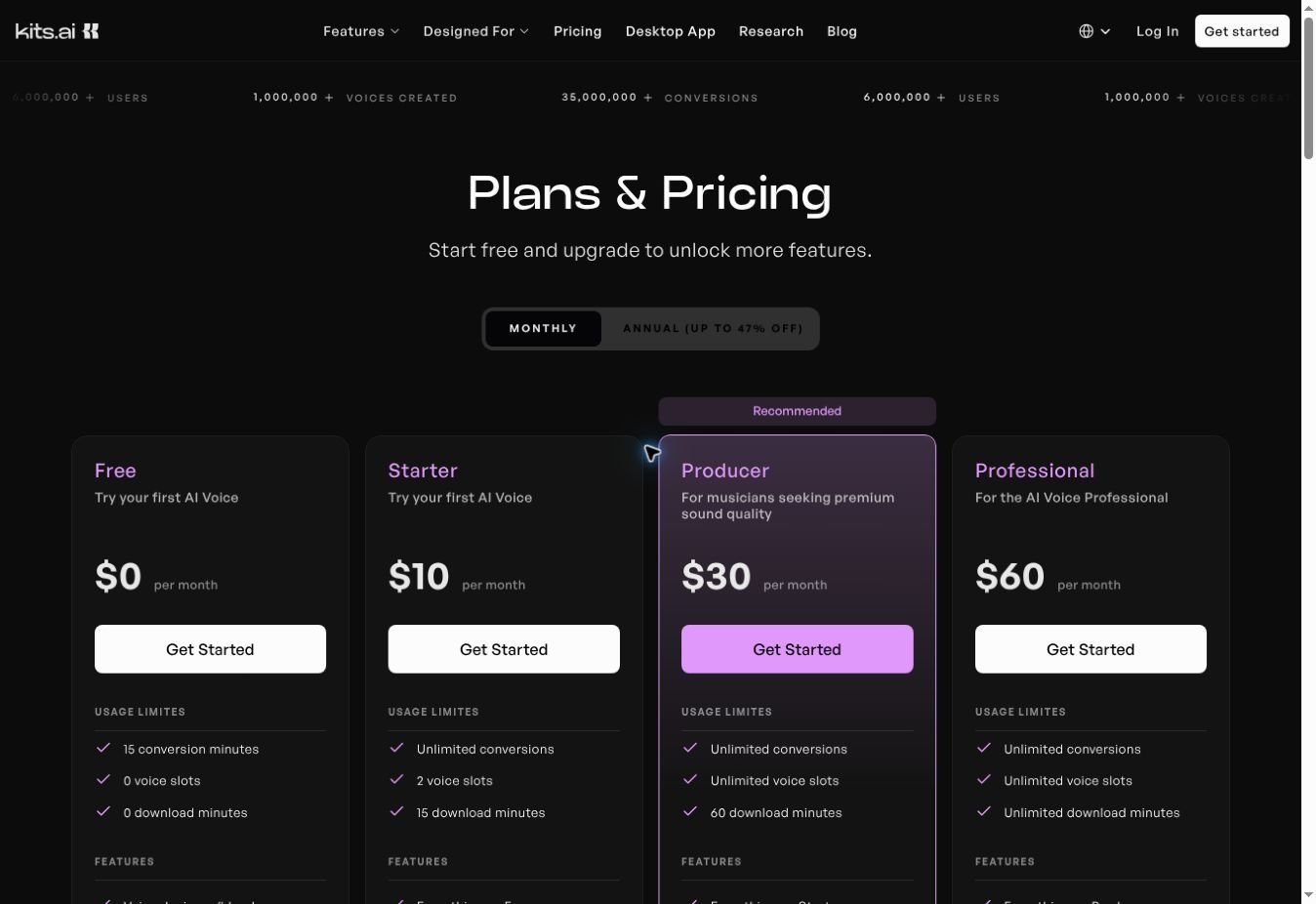
That specialist focus matters. A voice that reads a blog post well is not automatically good at singing. Kits provides vocal-oriented tools and lets creators build or blend voices for musical work.
What I like: useful vocal workflow, generative vocals, voice design, harmony tools and professional cloning on paid plans.
What to watch: the free plan is mainly for experimentation and includes no download minutes. Always use voices you own or have permission to use.
Current pricing: Free includes 15 conversion minutes. Monthly plans are Starter $10, Producer $30 and Professional $60; annual billing may reduce the effective price.
10. WellSaid — best for controlled corporate narration
WellSaid prioritizes consistent, polished English narration for business. Its voice styles and word-level control suit training, internal communications, product videos and advertising where repeatability matters more than novelty.
What I like: clear professional voices, reliable corporate tone, commercial rights and production controls.
What to watch: it is expensive for occasional creators and remains more English-focused than multilingual competitors. If Hindi or regional-language output matters, look elsewhere first.
Current pricing: Pro is listed at $49/month with 180 downloaded minutes per month, unlimited generation and commercial rights.
11. Uberduck — best for rap and creative experiments
Uberduck is the playful option: rap generation, creative voices, remix-style experiments and APIs. It is not my first choice for a serious audiobook, but it can be a better fit for characters, musical jokes and unusual social content.
What I like: creative tools, generated raps, low entry price and API access on commercial tiers.
What to watch: voice quality is less consistent for conventional narration, and non-commercial and commercial licences are separated by plan.
Current pricing: the annual Creator plan is shown at an effective $5/month and includes a commercial licence. The cheaper Starter plan is non-commercial.
12. NaturalReader — best for documents and commercial narration
NaturalReader serves two related but different markets. The personal product reads documents, PDFs and webpages aloud. The commercial AI Voice Generator creates downloadable audio licensed for videos, training, advertising and other redistributed content.
What I like: document support, OCR, pronunciation tools, multilingual voices and a clearly separated commercial product.
What to watch: do not assume audio from a personal listening plan can be republished commercially. Select the commercial version when creating content for an audience.
Current pricing: the commercial Starter plan is $29/month or $198/year. The personal Plus plan has separate pricing and rights.
13. Listnr — best for article-to-audio and podcast workflows
Listnr combines text-to-speech with podcast tools, hosting and embeddable audio. It can be useful for turning written content into a spoken edition without assembling several services.
What I like: broad voice catalogue, podcast-oriented workflow, article import and embeddable players.
What to watch: test URL import and your required languages before buying. Article parsers sometimes struggle with complex layouts, cookie banners or protected pages.
Best for: bloggers, podcast experiments and websites offering an audio version of articles.
Which AI voice generator should you choose?
To choose among the best AI voice generators, start with the job you need to complete—not the platform with the longest list of voices.
| Your project | Start with | Compare against |
|---|---|---|
| YouTube narration | ElevenLabs | Murf, LOVO |
| Hindi or Indian multilingual content | ElevenLabs | Speechify, Animaker, DupDub |
| Corporate training and e-learning | Murf | WellSaid, LOVO |
| PDFs and articles read aloud | Speechify | NaturalReader |
| Podcast with multiple speakers | LOVO | DupDub, Listnr |
| Voice inside an app or agent | PlayHT | ElevenLabs, Murf API |
| Songs and vocal production | Kits AI | Uberduck |
| Avatar explainer videos | Synthesys | LOVO, DupDub |
| Free experimentation | Animaker Voice | ElevenLabs free plan |
A five-minute test before you buy
Do not choose a voice from the vendor’s polished sample alone. Paste the same 120–150 word script into your top three tools. Include:
- a short sentence followed by a long sentence;
- a number, date and currency amount;
- your name, brand and one technical term;
- a Hindi or regional-language phrase if your content uses code-switching;
- a question, an emotional line and a deliberate pause.
Example: “On 26 September, our team processed 1,247 requests at a cost of ₹18,500. But speed was not the real problem. The question was simple: क्या ग्राहक को सही जवाब मिला? Kubernetes handled the traffic; people still had to handle the trust.”
Listen on both headphones and a phone speaker. Then score each result from 1–5 for pronunciation, rhythm, emotion, editing effort and consistency. The best first sample is not always the best production tool.
If your project begins with lectures, interviews or other recorded audio, our Whisper transcription guide can help you turn the recording into an editable script before generating a new voiceover.
How to make AI voices sound less artificial
- Write for the ear. Use shorter sentences and natural contractions.
- Use punctuation as direction. Commas, dashes and paragraph breaks shape delivery.
- Spell difficult pronunciations phonetically. Save them in a pronunciation dictionary when available.
- Generate in small sections. Regenerating 20 seconds is cheaper and more consistent than redoing ten minutes.
- Vary sentence length. Identical sentence patterns create a synthetic rhythm.
- Add silence in the editor. A technically perfect voice can still feel rushed.
- Do not overuse emotion controls. Mildly expressive usually sounds more believable than dramatic.
- Master the final audio. Light noise control, music ducking and volume normalization make a major difference.
Voice cloning, consent and commercial rights
Voice cloning is useful, but it creates the biggest risk in this category. Clone only your own voice or a voice for which you have explicit permission. Do not imitate a celebrity, colleague or family member for public content without consent.
Commercial use is also plan-specific. A tool may let you generate and preview audio for free while restricting monetized YouTube videos, advertisements, client work or redistribution. Check all three of these before publishing:
- Does your subscription include commercial rights?
- Is the selected library voice licensed for your use case?
- Does the platform where you publish require an AI or synthetic-media disclosure?
Keep a copy of the licence terms and your subscription invoice for important commercial projects. Rules can change after you create the audio.
Frequently asked questions
What is the most realistic AI voice generator?
ElevenLabs is the strongest general recommendation for realistic narration. WellSaid is excellent for controlled corporate English, while Murf performs well when voice must fit a structured video or training workflow.
Which AI voice generator is best for Hindi?
Start by testing ElevenLabs, Speechify, Animaker and DupDub with the same Hindi-English script. Hindi quality varies by voice, and code-switching is harder than generating a complete passage in one language.
Can I use an AI voice on a monetized YouTube channel?
Usually yes when your plan and selected voice include commercial rights. Monetization also depends on the originality and value of the complete video—not merely whether the narration is synthetic. Check the latest tool licence and platform policy before publishing.
Is there a completely free AI voice generator?
Animaker Voice offers a practical free allowance with downloads. ElevenLabs and several others also have free tiers, but free plans may restrict credits, exports, cloning or commercial use.
What are the best AI voice generators for YouTube?
ElevenLabs is the strongest starting point for natural YouTube narration, while Murf is easier when you need to align narration with slides, product demonstrations or training scenes. Animaker Voice is useful for testing a free workflow. Always confirm that your plan includes commercial use before monetizing the video.
What is the difference between an AI voice generator and an AI voice changer?
An AI voice generator creates speech directly from written text. A voice changer transforms an existing recording or live voice into another style or identity. Some platforms now provide both, but the input, editing process and licensing rules can be different.
How much do AI voice generators cost?
Free plans are common, but they usually limit characters, minutes, downloads or commercial rights. Entry-level paid plans in this comparison begin at about $5–$29 per month, while business platforms can cost more. Compare the number of downloadable minutes you receive, not only the advertised monthly price.
Can AI replace a professional voice actor?
For routine narration, prototypes, localization and frequent updates, often yes. For a flagship advertisement, dramatic performance or culturally sensitive storytelling, a skilled human actor and director can still deliver nuance that is difficult to reproduce consistently.
Final verdict
Among the best AI voice generators, there is no universal winner—but there is a sensible shortlist. Choose ElevenLabs when voice quality comes first, Murf for business production, Speechify for listening and accessibility, Animaker Voice for a useful free start, and Kits AI for music.
For more ways to combine AI with everyday work, see our guide to AI productivity tools that automate daily tasks.
My strongest advice is not to buy the tool with the longest feature list. Test three platforms with one difficult script, calculate the real cost of your monthly output, and confirm commercial rights. Ten minutes of disciplined testing can save months of frustration.