
Ever feel like you’re working all day but still not making real progress? Your inbox is overflowing, meetings keep piling up, and before you know it, the day is gone—yet the most important work remains untouched.
The problem? Not everything that demands your attention deserves it. We get stuck reacting to urgent tasks, jumping from one thing to the next, without ever stopping to ask: Is this actually important?
This is where the Eisenhower Matrix comes in. Used by Dwight D. Eisenhower, a U.S. president known for his sharp decision-making, this method helps you cut through the noise and focus on what truly matters. By categorizing tasks based on urgency and importance, it gives you a clear roadmap for what to tackle, what to schedule, what to delegate, and what to eliminate.
In this article, we’ll break down how to use the Eisenhower Matrix, complete with real-world examples, templates, and a step-by-step guide to help you apply it immediately. If you’re tired of feeling busy but unproductive, this is the prioritization system that can help you take back control of your time.
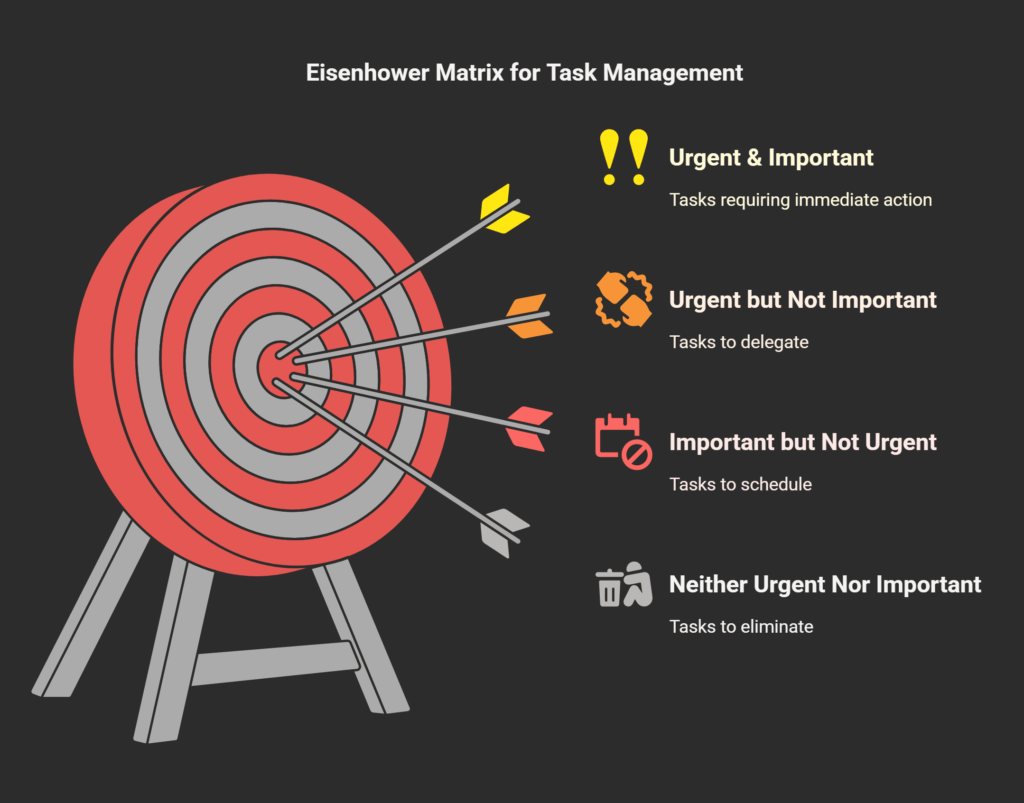
What is the Eisenhower Matrix? (Explained Simply)
Most people spend their days reacting—answering emails, attending meetings, putting out fires—without stopping to ask if what they’re doing actually matters. The Eisenhower Matrix solves this problem by helping you prioritize with clarity, so you focus on tasks that drive results instead of just staying busy.
The Origins of the Eisenhower Matrix
The matrix is named after Dwight D. Eisenhower, the 34th U.S. president, who was known for making sharp, strategic decisions. His leadership in both military and politics relied on the ability to distinguish between what was truly important and what was merely urgent.
This idea was later formalized into a four-quadrant matrix by productivity expert Stephen Covey in his book The 7 Habits of Highly Effective People. Today, it’s widely used by entrepreneurs, executives, and professionals to manage time more effectively.
How the Eisenhower Matrix Works
The matrix sorts tasks into four quadrants based on two factors:
- Urgency – Does it require immediate attention?
- Importance – Does it contribute to long-term success?
Using these criteria, tasks are categorized as:
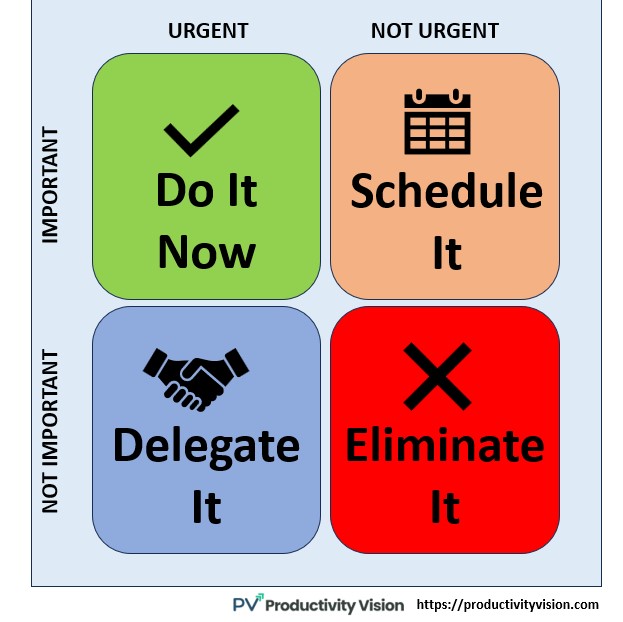
1. Urgent & Important → Do it now. These tasks require immediate action and have direct consequences.
2. Urgent but Not Important – Delegate it. These demand attention but don’t require your expertise.
3. Important but Not Urgent – Schedule it. These contribute to your long-term goals but don’t need immediate attention.
4. Neither Urgent Nor Important – Eliminate it. These tasks add no real value and should be minimized or removed.
By using this framework, you’ll stop wasting time on distractions and start prioritizing what truly moves you forward.
The Four Quadrants of the Eisenhower Matrix (Deep Dive with Examples)
The Eisenhower Matrix isn’t just a theory—it’s a practical tool for making smarter decisions about where to invest your time. To apply it effectively, you need to understand the four quadrants and how to categorize your tasks correctly.
Quadrant 1: Urgent & Important (Do It Now)
These tasks require immediate attention and have serious consequences if ignored. They’re often deadline-driven, crisis-related, or critical for success.Examples:
- A looming work deadline that can’t be postponed
- A last-minute client request that affects business revenue
- Handling an unexpected crisis, like a server crash or financial emergency
- Preparing for an important presentation happening today
How to Handle It:
- Act on these tasks immediately.
- Plan ahead so fewer tasks end up in this category (many urgent tasks come from neglecting Quadrant 2).
- If possible, delegate some aspects of these tasks to lighten the load.
💡 Key Insight: If you spend all your time in Quadrant 1, you’re constantly in crisis mode. The key to reducing stress is shifting more focus to Quadrant 2.
Quadrant 2: Important but Not Urgent (Schedule It)
These tasks don’t demand immediate attention, but they’re essential for long-term growth and success. This is where strategic planning, skill-building, and high-value work happen.
Examples:
- Planning long-term business or career goals
- Learning new skills or improving existing ones
- Networking and building key relationships
- Investing in health and fitness (exercise, meal planning)
How to Handle It:
- Schedule time for these tasks on your calendar.
- Set deadlines to ensure they don’t get pushed aside.
- Prioritize them before they become urgent.
💡 Key Insight: The more time you spend in Quadrant 2, the fewer crises you’ll have in Quadrant 1. Highly successful people focus on long-term progress, not just daily urgency.
Quadrant 3: Urgent but Not Important (Delegate It)
These tasks feel urgent but don’t contribute significantly to your success. They often come in the form of interruptions, unnecessary meetings, or routine admin work.
Examples:
- Answering emails that don’t require your direct input
- Sitting in meetings that don’t need your participation
- Handling small, repetitive tasks that could be automated or outsourced
- Responding to non-critical messages and calls
How to Handle It:
- Delegate or outsource these tasks whenever possible.
- Use automation tools to handle repetitive work (email filters, scheduling software).
- Set boundaries to avoid constant interruptions (turn off notifications, use time-blocking).
💡 Key Insight: Many professionals mistake urgency for importance, leading them to waste hours on tasks that could easily be handled by someone else.
Quadrant 4: Neither Urgent Nor Important (Eliminate It)
These are pure distractions—tasks that add no real value to your goals or productivity. They consume time but contribute nothing meaningful.
Examples:
- Mindless scrolling on social media
- Watching excessive TV or random YouTube videos
- Attending pointless meetings with no clear objective
- Engaging in gossip or unproductive small talk at work
How to Handle It:
- Be ruthless in eliminating distractions.
- Use time limits for entertainment and social media.
- Ask yourself before doing anything: “Is this moving me closer to my goals?” If not, cut it out.
💡 Key Insight: If you often feel busy but unproductive, it’s likely because Quadrant 4 tasks are stealing valuable time.
How to Balance the Quadrants for Maximum Productivity
- Spend most of your time in Quadrant 2 (Important but Not Urgent)—this prevents future crises.
- Minimize Quadrant 1 by planning ahead—avoid last-minute deadlines.
- Outsource or delegate Quadrant 3 tasks—your time is better spent elsewhere.
- Eliminate Quadrant 4 distractions—these are the biggest time-wasters.
By mastering these four quadrants, you’ll shift from being reactive to proactive, taking control of your time instead of letting it control you.
How to Use the Eisenhower Matrix in Real Life (Step-by-Step Guide)
Understanding the Eisenhower Matrix is one thing—applying it to your daily life is where the real change happens. Here’s a simple step-by-step guide to help you integrate this method into your workflow.
Step 1: List All Your Tasks
Start by writing down everything on your to-do list for the day or week. Include big and small tasks, deadlines, meetings, personal errands—everything that’s taking up mental space.
💡 Pro Tip: If your list is too long, start with the top 10-15 tasks that are weighing on you the most.
Step 2: Categorize Each Task into the Four Quadrants
Look at each task and ask yourself two key questions:
- Is this task urgent? (Does it need to be done immediately?)
- Is this task important? (Does it contribute to long-term goals?)
Then, place each task into the appropriate quadrant:
- Quadrant 1: Urgent & Important – Deadlines, emergencies, crisis tasks. Do these first.
- Quadrant 2: Important but Not Urgent – Goal-setting, skill-building, planning. Schedule these.
- Quadrant 3: Urgent but Not Important – Interruptions, admin work, emails. Delegate these.
- Quadrant 4: Neither Urgent Nor Important – Time-wasters, distractions. Eliminate these.
💡 Pro Tip: If you’re struggling to decide, ask: “If I ignore this task, will it have serious consequences?”
Step 3: Take Action on Each Quadrant
Once your tasks are sorted, act accordingly:
- Quadrant 1: Get these done immediately. Block time on your schedule to complete them first.
- Quadrant 2: Schedule these tasks. If it’s important but not urgent, set a deadline so it doesn’t get pushed aside.
- Quadrant 3: Delegate or automate these tasks. Ask yourself: “Does this task really require my time?” If not, pass it to someone else or use productivity tools.
- Quadrant 4: Cut it out. If it’s not adding value, remove it from your routine.
💡 Pro Tip: Many people overload Quadrant 1 because they neglect Quadrant 2. The more time you spend planning ahead, the fewer crises you’ll have to deal with.
Step 4: Review and Adjust Weekly
Priorities shift—what was important today might not be tomorrow. Set aside time each week (Sunday evening or Monday morning works best) to review your Eisenhower Matrix and adjust your plan.
- Move tasks as needed—some Quadrant 2 tasks may become urgent, or you may find new items to eliminate.
- Assess what’s working—are you spending enough time in Quadrant 2? Are Quadrant 1 tasks overwhelming you?
- Refine your workflow—the goal is to spend less time on urgent tasks and more time on proactive, strategic work.
💡 Pro Tip: The more consistently you use the matrix, the easier prioritization becomes. Over time, you’ll instinctively know where tasks belong.
Bringing It All Together
The Eisenhower Matrix isn’t just about managing tasks—it’s about taking control of your time so you can focus on what truly matters.
1️⃣ List your tasks.
2️⃣ Sort them into the four quadrants.
3️⃣ Take action accordingly—do, schedule, delegate, or eliminate.
4️⃣ Review weekly and adjust as needed.
If you commit to using this system, you’ll spend less time putting out fires and more time achieving meaningful results.
Eisenhower Matrix Examples (Real-Life Scenarios)
Understanding the Eisenhower Matrix is one thing—seeing how it works in real situations makes it easier to apply. Below are three common scenarios where this method can transform the way you manage your time.
Example 1: The Busy Entrepreneur
Meet Sarah, a startup founder. Every day, she’s pulled in multiple directions—meeting with investors, handling customer issues, planning long-term strategies, and overseeing product development. She’s constantly working late, yet she feels like she’s barely making progress. Without a prioritization system, everything feels urgent, and she’s drowning in tasks.
How Sarah Uses the Eisenhower Matrix:
- Quadrant 1 (Urgent & Important) – An investor pitch is scheduled for tomorrow. She blocks two hours in the morning to finalize her presentation.
- Quadrant 2 (Important but Not Urgent) – Strategic planning for business growth. She schedules a weekly session every Monday to work on this.
- Quadrant 3 (Urgent but Not Important) – Responding to customer support emails. She delegates this task to her assistant, allowing her to focus on high-impact work.
- Quadrant 4 (Neither Urgent Nor Important) – Scrolling LinkedIn for hours without purpose. She limits her social media time to 15 minutes per day.
Result? Sarah now spends more time on long-term business growth rather than reacting to daily fires. By scheduling important tasks ahead of time and delegating non-essential work, she’s able to stay focused and productive without working late every night.
Example 2: The Overwhelmed Employee
Meet James, a corporate project manager. His workdays are filled with back-to-back meetings, endless emails, and urgent requests from his team. He starts each day with a long to-do list, but by the time he’s done attending meetings and answering messages, he’s too drained to focus on deep work. His biggest frustration? He’s constantly busy, but he’s not actually moving forward in his career.
How James Uses the Eisenhower Matrix:
- Quadrant 1 (Urgent & Important) – A key project milestone is due this week. James blocks off two-hour focus sessions every morning to make steady progress.
- Quadrant 2 (Important but Not Urgent) – Professional development. He schedules an hour every Friday to take online leadership courses and network with senior colleagues.
- Quadrant 3 (Urgent but Not Important) – Attending daily check-in meetings that don’t require his input. He requests a summary email instead.
- Quadrant 4 (Neither Urgent Nor Important) – Constant Slack messages and group chats. He turns off notifications during deep work sessions.
Result? By cutting unnecessary meetings and limiting distractions, James now has more uninterrupted time to complete important projects and grow his skillset. His boss notices his improved performance, and within months, he’s promoted to a senior role.
Example 3: The Productivity Enthusiast
Meet Lisa, a freelance graphic designer. She loves her work but struggles with managing her time efficiently. Without a structured schedule, she often gets distracted by minor tasks and ends up working late nights to meet deadlines. Some weeks, she’s overloaded with work, while other weeks, she’s scrambling to find new clients. She knows she needs a better system to stay consistent and avoid burnout.
How Lisa Uses the Eisenhower Matrix:
- Quadrant 1 (Urgent & Important) – A client’s project deadline is today. She dedicates the first half of her day to completing it without distractions.
- Quadrant 2 (Important but Not Urgent) – Updating her portfolio and marketing her services. She schedules two hours every Wednesday to refresh her portfolio and reach out to potential clients.
- Quadrant 3 (Urgent but Not Important) – Answering general client inquiries that don’t require immediate attention. She sets a specific time in the afternoon to check emails instead of responding all day.
- Quadrant 4 (Neither Urgent Nor Important) – Watching random YouTube videos when she should be working. She installs a browser blocker during work hours.
Result? Lisa now has a steady workflow and higher-paying clients because she’s consistently marketing her services. By dedicating time to Quadrant 2, she no longer experiences work droughts or last-minute deadline stress.
Example 4: The Work-Life Balance Seeker
Meet Alex, a busy parent and full-time professional. Between office work, family responsibilities, and personal goals, he feels stretched too thin. His to-do list is endless, and he struggles to find time for things that truly matter—like spending time with his kids, exercising, and pursuing hobbies.
How Alex Uses the Eisenhower Matrix:
- Quadrant 1 (Urgent & Important) – Preparing a presentation for a leadership meeting tomorrow. He blocks off two hours in the evening to complete it before bedtime.
- Quadrant 2 (Important but Not Urgent) – Health and fitness. He schedules early morning workouts before the rest of the household wakes up.
- Quadrant 3 (Urgent but Not Important) – Helping colleagues with minor work issues. He politely declines non-essential tasks and sets clearer boundaries.
- Quadrant 4 (Neither Urgent Nor Important) – Late-night binge-watching. He replaces this habit with a 30-minute reading session before bed.
Result? By prioritizing important but non-urgent tasks like exercise and family time, Alex no longer feels overwhelmed or guilty about neglecting his personal life. He’s more present at work and at home, without sacrificing his well-being.
Eisenhower Matrix Templates (Excel & PDF Downloads)
Now that you understand how the Eisenhower Matrix works, having a ready-to-use template can make implementation much easier. Instead of manually sorting tasks each day, you can use pre-designed templates to quickly categorize and prioritize your work.
Why Use an Eisenhower Matrix Template?
- Saves Time – No need to create a matrix from scratch every day.
- Provides Clarity – Visually seeing tasks in different quadrants helps in making better decisions.
- Eliminates Mental Overload – Helps you focus on what truly matters instead of reacting to everything.
- Flexible & Reusable – Templates can be customized for work, personal tasks, or a mix of both.
To make it easier for you to get started, here are ready-made Eisenhower Matrix templates you can download:
Printable Eisenhower Matrix Template (PDF Format)
Perfect for those who prefer pen-and-paper planning. Includes a clean layout for manually writing tasks under each quadrant.






One Comment
Comments are closed.